Authenticate with OAuth
To enable Imply Hybrid (formerly Imply Cloud) Auth for your organization, contact your Imply account representative.
With Imply Hybrid Auth enabled, you can create custom API clients to authenticate REST API requests to the Imply API using the OAuth 2.0 authorization framework.
Prerequisites
To create and manage API clients, you must have one of the following roles:
administer-account: Administer the entire organization, including managing users, creating API clients, and setting password policies.administer-clients: Create, manage, and delete API clients.
See User roles for more information.
Authentication flow
To authenticate with OAuth:
- Enable the OAuth 2.0 feature flag.
- Create an API client to obtain OAuth 2.0 credentials.
- Obtain an access token. The access token is tied to the client and grants API access.
- Send the access token in the HTTP
Authorizationheader using Bearer authentication:Authorization: Bearer TOKEN.
Enable the OAuth 2.0 feature flag
To authenticate with OAuth, you must first enable the OAuth 2.0 feature flag for your Imply Hybrid account. It's disabled by default.
To enable the OAuth 2.0 feature flag:
- From the Imply Manager, click Manage for the cluster.
- Click Setup in the left sidebar.
- Scroll down and expand the Advanced config settings.
- Under Feature flags, click the edit icon to open the feature flags dialog.
- Select the OAuth 2.0 feature flag.
- Click OK.
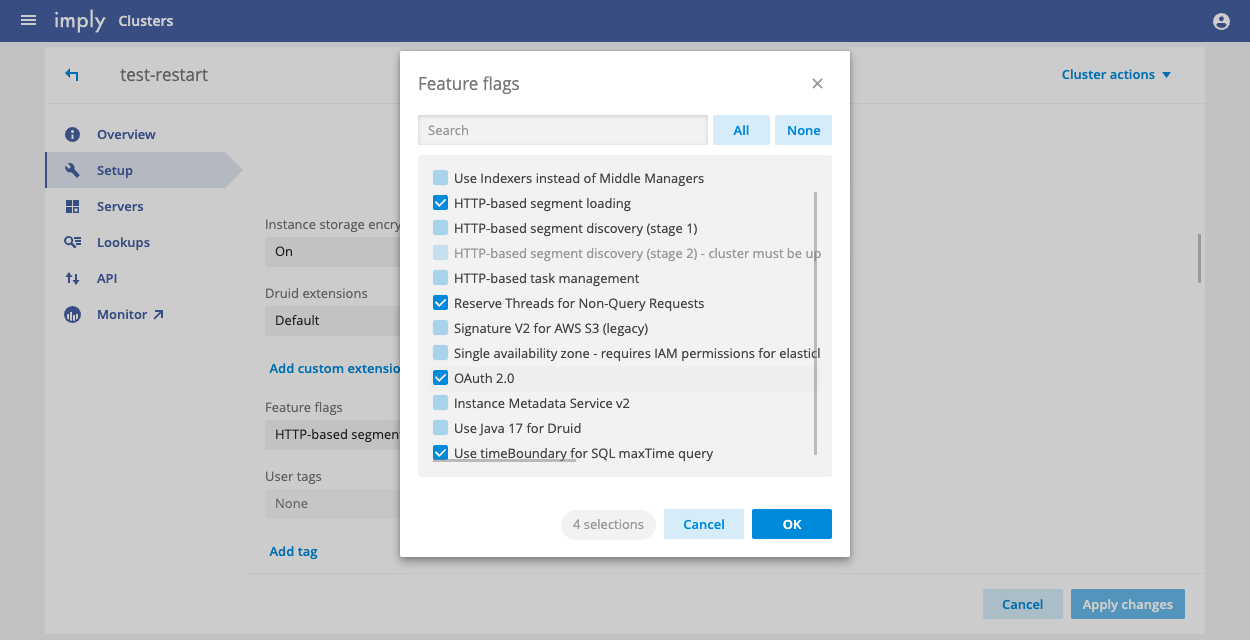
- Restart the cluster to apply the changes. This interrupts service for a few minutes.
Create an API client
You configure and manage API clients from the User management console, the same console you use to manage Imply Hybrid users.
To create a custom API client:
- Navigate to the User management console.
- Click API Clients in the left sidebar.
- Click Create API Client.
- Enter a client identifier in the API Client ID field.
- Click Save.
- Optionally configure the access token lifespan:
- By default, API tokens expire after five minutes.
- If you can't acquire new tokens at this cadence, modify the lifespan in the Access Token Lifespan field.
- Tokens are automatically revoked when they reach the configured lifespan.
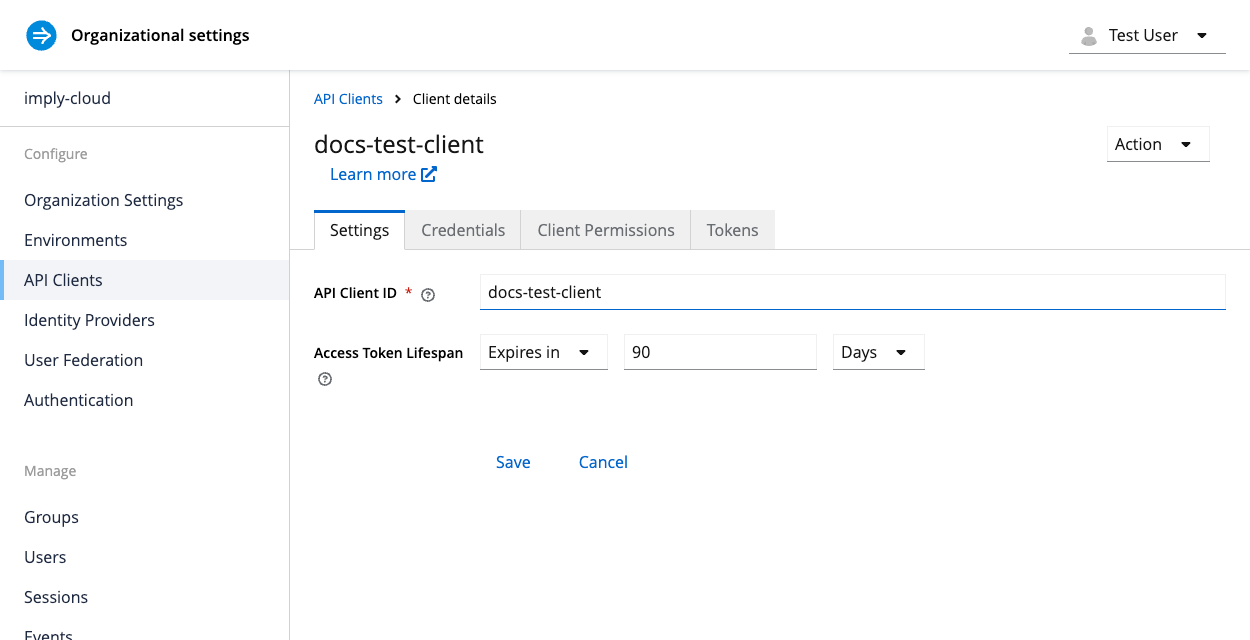
- Go to the Client Permissions tab.
- Click Assign permissions and select the role you want to assign.
- Click Save.
To download the token, go to the Tokens tab and click Download Token. Alternatively, you can obtain the token through the API as shown in the following section.
Get the token by API
After creating the API client, you can acquire access tokens programmatically:
curl --request POST 'https://id.imply.io/auth/realms/{organization_name}/protocol/openid-connect/token' \
--header 'Content-Type: application/x-www-form-urlencoded' \
--data-urlencode 'client_id={client_id}' \
--data-urlencode 'client_secret={client_secret}' \
--data-urlencode 'grant_type=client_credentials'
Replace the following placeholders with your own values:
{organization_name}: Your organization name in Imply Hybrid Auth{client_id}: The client ID you configured{client_secret}: Your client secret (visible in the Credentials tab)
Modify an API client
To modify an API client:
- Click API Clients in the left sidebar.
- Click the ellipsis next to the API client and select Edit.
- Modify the general settings, roles, or other properties as needed.
Regenerate the client secret
Regenerating the secret invalidates the current secret. Applications using the old secret will stop working.
To regenerate the secret:
- Click API Clients in the left sidebar.
- Click the ellipsis next to the API client.
- Go to the Credentials tab.
- Click Regenerate.
- Confirm your selection.
- Update your applications with the new secret.
Delete an API client
This action is irreversible.
After you delete the client:
- You can't create new tokens.
- Existing tokens expire in five minutes or at the configured time to live (TTL), whichever comes first.
If you have any long-lived tokens, contact Imply.
To delete an API client:
- Click API Clients in the left sidebar.
- Click the ellipsis next to the API client and select Delete.
- Confirm your selection when prompted.