Event lifecycle
AI summary
About AI summaries.
Imply Lumi collects, processes, and stores events. It receives events through an integration consisting of a receiver and an IAM key. If you have a pipeline configured, Lumi first evaluates each event against the pipeline's conditions before storing it.
For an overview of sending and processing events, see Send events to Lumi.
This topic describes the lifecycle of an event in Lumi.
Stages in the event lifecycle
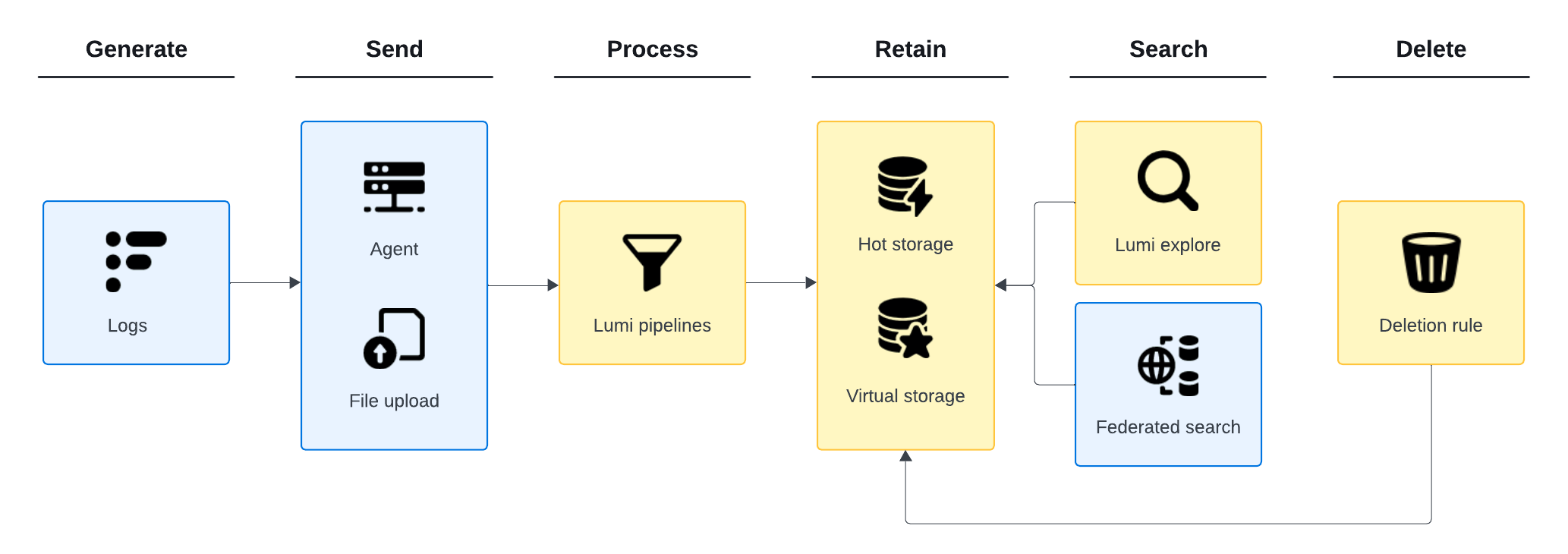
The general lifecycle of an event in Lumi is as follows:
- An application generates an event.
- An upstream agent processes and forwards the event to Lumi.
- A Lumi receiver ingests the event and assigns system and user attributes.
- Lumi transforms the event with any configured pipelines.
- Lumi evaluates the event against any tiering rules and retains it in the hot tier for the specified retention period. Once retained, the event becomes immediately searchable within Lumi and through federated search.
- Lumi evaluates the event against any deletion rules and deletes the event if it meets the rule conditions.
The following diagram illustrates this lifecycle:
Data deletion
By default, Lumi retains data for as long as the account remains active. Lumi permanently deletes all associated data 45 days after account deactivation.
You control how long data remains in Lumi using deletion rules. A deletion rule specifies the period to retain data and the conditions that determine which data to delete. Lumi evaluates data for automatic deletion approximately once per day. For more information, see Configure deletion rules.
Example
The following example shows how an event sent from Splunk® to Lumi using a Splunk ingest action for routing to S3 is transformed along the way.
The following is an example of a raw event:
87.129.182.205 - jaredevans [11/Aug/2025:22:24:37 +0000] "GET /products HTTP/1.1" 200 1987 "-" "Mozilla/5.0 (Linux; Android 5.1.1; Nexus 5) AppleWebKit/537.36 (KHTML, like Gecko) Chrome/91.0.4472.124 Mobile Safari/537.36"
A Splunk event collector receives the raw event and parses it into key-value pairs. The event collector enriches the event with metadata, including the following:
{
  "host":"web-1",
  "index":"main",
  "source":"site_visitors.log",
  "sourcetype":"access_combined"
}
Click to view the event enriched by Splunk
{
  "_raw": "87.129.182.205 - jaredevans [11/Aug/2025:22:24:37 +0000] \"GET /products HTTP/1.1\" 200 1987 \"-\" \"Mozilla/5.0 (Linux; Android 5.1.1; Nexus 5) AppleWebKit/537.36 (KHTML, like Gecko) Chrome/91.0.4472.124 Mobile Safari/537.36\"",
  "_time": "2025-08-11T17:24:37.000-0500",
  "bytes": "1987",
  "clientip": "87.129.182.205",
  "date_hour": "22",
  "date_mday": "11",
  "date_minute": "24",
  "date_month": "august",
  "date_second": "37",
  "date_wday": "monday",
  "date_year": "2025",
  "date_zone": "0",
  "file": "products",
  "host": "web-1",
  "ident": "-",
  "index": "main",
  "linecount": "1",
  "method": "GET",
  "punct": "..._-__[//:::_+]_\"_/_/.\"___\"-\"_\"/._(;__..;__)_/._(",
  "referer": "-",
  "req_time": "11/Aug/2025:22:24:37 +0000",
  "source": "site_visitors.log",
  "sourcetype": "access_combined",
  "splunk_server": "localdomain",
  "status": "200",
  "timeendpos": "55",
  "timestartpos": "29",
  "uri": "/products",
  "uri_path": "/products",
  "user": "jaredevans",
  "useragent": "Mozilla/5.0 (Linux; Android 5.1.1; Nexus 5) AppleWebKit/537.36 (KHTML, like Gecko) Chrome/91.0.4472.124 Mobile Safari/537.36",
  "version": "HTTP/1.1"
}
A Splunk ingest action routes the event to Lumi using a ruleset.
A Lumi receiver collects the event. The event header includes an IAM key token used to authenticate the connection. The token contains the following global attributes:
env: tutorial
team: learning
Lumi uses these global attributes along with the system attributes—collector, eventId, processor, receiver, and iamKeyId—to enrich the event.
Lumi retrieves the following attributes assigned by Splunk and applies them to the event as user attributes:
host: web-1
index: main
source: site_visitors.log
sourcetype: access_combined
The pipeline uses the regular expression (regex) processor to extract text from the event message and assigns it to a user attribute named http_version.
See Processors for more information.
As a result, the enriched event consists of a combination of attributes set by Splunk, the pipeline, and the integration in Lumi.
Timestamp:
Aug 11, 05:24:37.000 PM
Message:
87.129.182.205 - jaredevans [11/Aug/2025:22:24:37 +0000] "GET /products HTTP/1.1" 200 1987 "-" "Mozilla/5.0 (Linux; Android 5.1.1; Nexus 5) AppleWebKit/537.36 (KHTML, like Gecko) Chrome/91.0.4472.124 Mobile Safari/537.36"
System attributes:
collector: ec 20250812.1514.0
env: tutorial
eventId: e_01K2FCP5Q5CAPRKY2B8Z86FZR1-13
iamKeyId: b6497b5b-f099-47b1-8d82-79d298baead5
processor: ec 20250812.1514.0
receiver: splunk.s3
team: learning
User attributes:
host: web-1
http_version: 1.1
index: main
source: site_visitors.log
sourcetype: access_combined
Learn more
See the following topics for more information:
- Glossary for definitions of Lumi terms.
- Event model for the event model for events stored in Lumi.
- Send events to Lumi for factors to consider when sending events.
- Data tiers overview to learn about data tiers in Lumi.
- Transform events using pipelines to create and manage pipelines.