Search events with Splunk
AI summary
About AI summaries.
Imply Lumi integrates with Splunk® to let you query Lumi events using Splunk Search Processing Language (SPL). You can analyze Lumi events alongside your Splunk data without duplicating data or changing your existing workflows.
You can use standard and transparent federated modes:
- Transparent mode: Required for data model queries and lookups, but can also be used without these features. Doesn't require the
federated:query prefix. We recommend using transparent mode as the easiest way to query Lumi events directly from Splunk. See Set up transparent federated search and Query events with data models. - Standard mode: Provides explicit control over which federated indexes are queried. Doesn't support data models or lookups. Requires the
federated:query prefix. See Set up standard federated search.
Both modes send queries from Splunk to a Lumi index, but they take different paths. The following diagram compares the two:
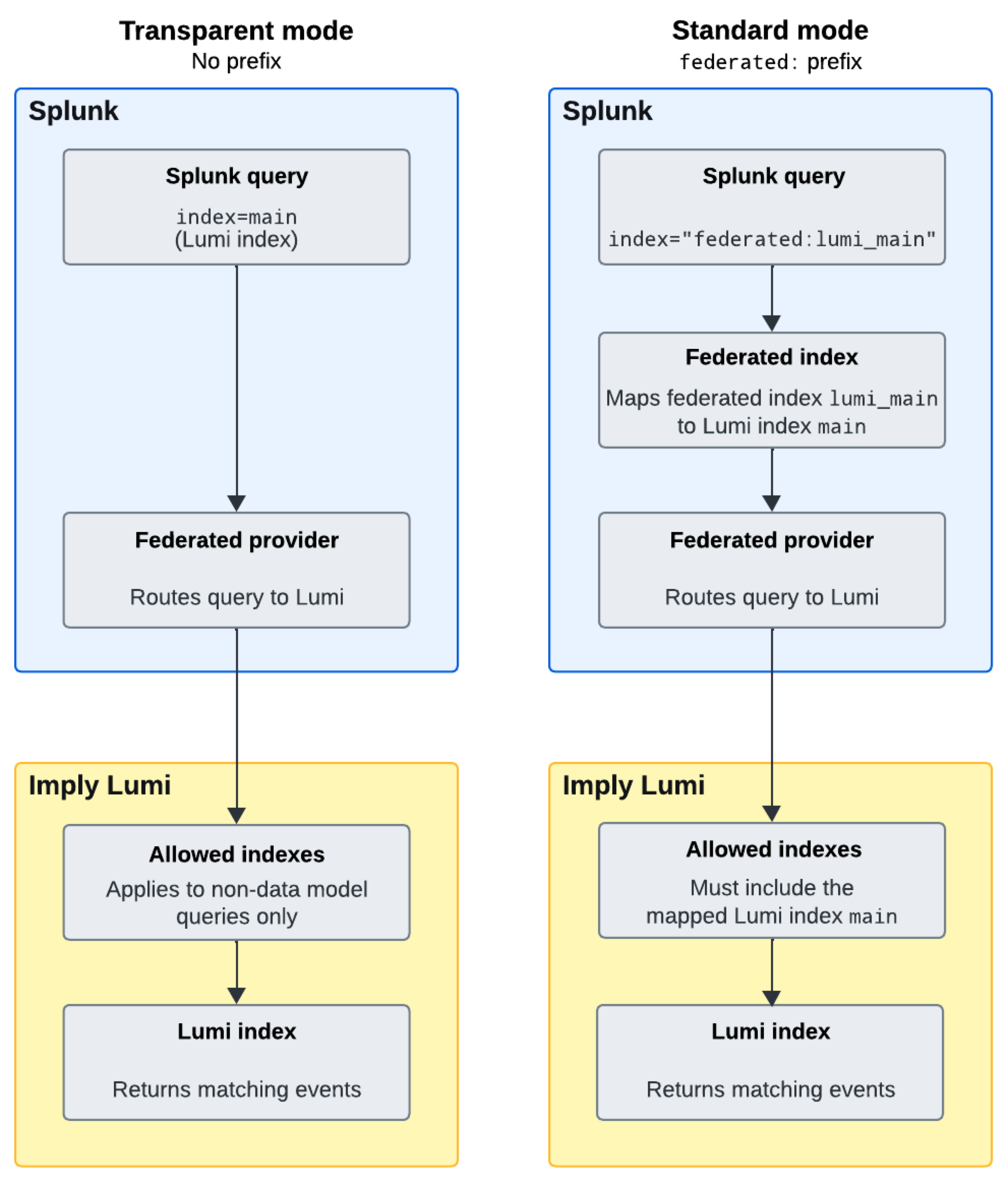
Transparent mode uses Allowed indexes on the IAM key only. There's no federated index to configure. Allowed indexes applies to non-data-model queries only; data model queries aren't affected.
Standard mode routes a query through a Splunk federated index to a Lumi index, and requires two settings that must agree:
the Remote dataset on the federated index, and Allowed indexes on the IAM key.
For example, if the federated index lumi_main maps to the Lumi index main, the IAM key must include main as an allowed index.
Otherwise, queries using federated:lumi_main return no results.
For setup details, see Set up standard federated search and Set up transparent federated search.
Choosing a mode
Use transparent mode if you:
- Need data model or lookups support.
- Want to query Lumi and Splunk indexes using the same syntax, without the
federated:prefix.
Use standard mode if you:
- Need to use different index names in Splunk than those configured in Lumi.
- Want to explicitly prefix queries to Lumi indexes with
federated:.
Don't enable both transparent and standard federated providers that point to the same Lumi endpoint, because it can cause inconsistent results. See Troubleshoot data model queries for details.
Once you've configured federated search, refer to the Federated search reference for a complete list of supported SPL commands, syntax, and functions. See Federated search examples for sample queries with example output. If data model queries return unexpected results, see Troubleshoot data model queries.
To track and optimize your federated queries, see Monitor search performance for guidance on using the Splunk job inspector to examine search execution.