Configure Lumi for data model queries
AI summary
About AI summaries.
This topic describes how to configure Imply Lumi to support Splunk® data model queries: prepare your Lumi events with the fields the data model expects, then map those fields with the data model attribute on the IAM key.
For an overview of how Lumi resolves data model queries, see Query Lumi events with data models.
Prerequisites
Before you can query Lumi events with a data model, you need the following:
- One or more data models configured in Splunk. Review the table under Data model acceleration and set acceleration accordingly.
- Lumi events with extracted fields that correspond to data model fields. The IAM key mapping only translates field names—it doesn't extract, evaluate, or calculate fields. See Prepare event fields if your events don't yet have the fields you plan use for searches.
Map data model fields
Include all fields that the Splunk data model expects in the IAM key field mapping, including fields where the Lumi field name matches the data model field name. Lumi returns empty columns for unmapped fields. See Field mapping example for more detail.
The special data model fields _time, source, sourcetype, and host are an exception—all Splunk data models inherit them so Lumi automatically maps them.
You don't need to add them to your field mappings.
A single IAM key can support multiple data models.
You can map fields from multiple data models to the same Lumi field.
For example, you can map both the Web data model's dest field and the Network Traffic data model's dest field to Lumi's host field.
Prepare event fields
When you query Lumi through a transparent federated provider, Splunk's search-time eval expressions and field extractions don't execute.
If you define a field as an eval expression in a Splunk data model, that field doesn't carry over to Lumi.
To return results from Lumi, the field must exist on your Lumi events and be included in the IAM key field mapping.
If your events don't have the fields, extract them at index time using a Lumi pipeline. Check the predefined pipelines reference for a pipeline that matches your event format; otherwise, create your own.
For example, suppose you're mapping the Web data model fields http_method and status, but your Lumi events contain raw Apache access logs with no extracted fields.
Add a pipeline that parses the log line into fields such as method and status at ingestion.
You can then map http_method to method and status to status in the IAM key.
The exception is expanded searches, where Splunk embeds the data model's eval expressions into the search it sends.
Lumi executes them as part of the search.
See Data model acceleration for more information.
For the full list of unsupported Splunk knowledge objects, see Known limitations.
Define the data model attribute
The data model attribute on the IAM key is a JSON object that maps Splunk data model fields to Lumi event fields.
Lumi uses this attribute only when Splunk sends a data model query. For expanded searches, the Splunk data model definition is included with the search and Lumi doesn't use this attribute. See Data model acceleration for more information.
The JSON structure is organized hierarchically: data models contain datasets, and datasets can contain child datasets.
The required JSON format for the attribute is as follows:
{
  "<dataModelName1>": {
    "<datasetName1>": {
      "filter": "<filter string>",
      "fields": {
        "<datasetFieldName1>": "<lumiFieldName1>",
        "<datasetFieldName2>": "<lumiFieldName2>"
      },
      "childDatasets": {
        "<childDatasetName1>": {
          "filter": "<filter string>",
          "fields": {
            "<datasetFieldName1>": "<lumiFieldName1>",
            "<datasetFieldName2>": "<lumiFieldName2>"
          }
        }
      }
    },
    "<datasetName2>": {}
  },
  "<dataModelName2>": {}
}
View JSON properties
-
dataModelName- Name of the data model in Splunk.
-
datasetName- Name of the dataset in Splunk.
-
filter- Lumi filter to identify events for the data model mapping. Optionally include an index—for example,
index=main. See Lumi query syntax for the filter format.
Note that child dataset filters inherit the parent's filter and don't need to specify an index.
- Lumi filter to identify events for the data model mapping. Optionally include an index—for example,
-
fields- Key-value pairs mapping Splunk data model field names (keys) to Lumi field names (values). Include all data model fields in the mapping, even when field names match, since Lumi returns empty columns for unmapped fields.
The special data model fields_time,source,sourcetype, andhostare an exception—all Splunk data models inherit them so Lumi automatically maps them. You don't need to add them to your field mappings.
- Key-value pairs mapping Splunk data model field names (keys) to Lumi field names (values). Include all data model fields in the mapping, even when field names match, since Lumi returns empty columns for unmapped fields.
-
childDatasets- Optional nested datasets that inherit from the parent dataset.
Field mapping example
This example shows field mappings for the CIM Web data model:
{
  "Web": {
    "Web": {
      "fields": {
        "src": "clientip",
        "url": "uri_path",
        "dest": "host",
        "user": "user",
        "status": "status",
        "http_method": "method",
        "http_user_agent": "useragent"
      },
      "filter": "index=main sourcetype=access_combined",
      "childDatasets": {
        "Proxy": {
          "fields": {
            "http_referrer": "referer"
          },
          "filter": "host=proxy-01"
        }
      }
    }
  }
}
This configuration tells Lumi to:
- Map incoming events with
index=mainandsourcetype=access_combinedto the Web data model and Web dataset. - Map Lumi's
hostfield to the data modeldestfield, Lumi'smethodfield to the data modelhttp_methodfield, and Lumi'suserfield to the data modeluserfield. - Apply additional mappings to child dataset Proxy for events matching the parent filter and
host=proxy-01.
To query the child dataset, see Child dataset queries.
View Splunk data model interface
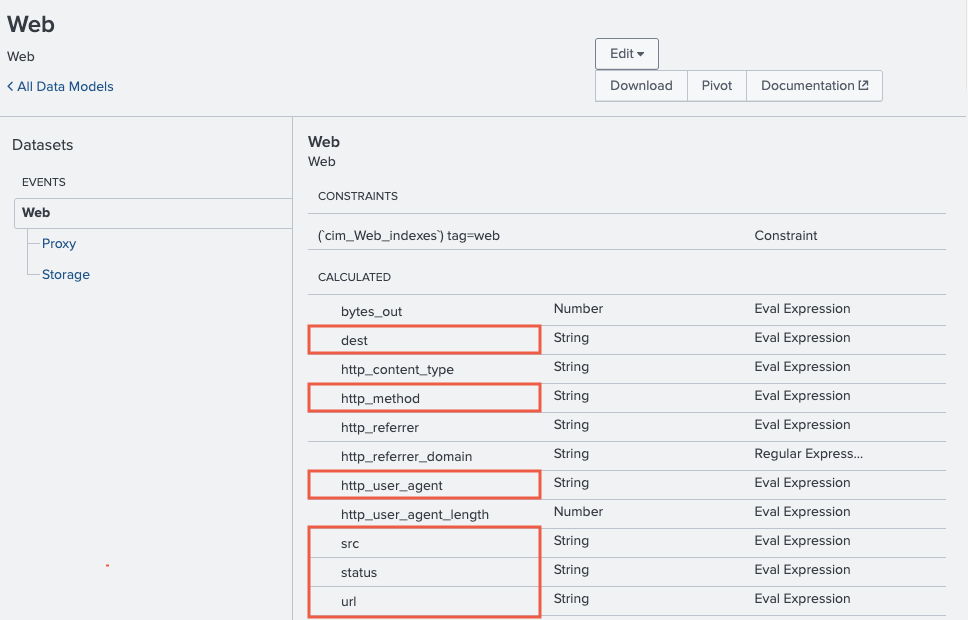
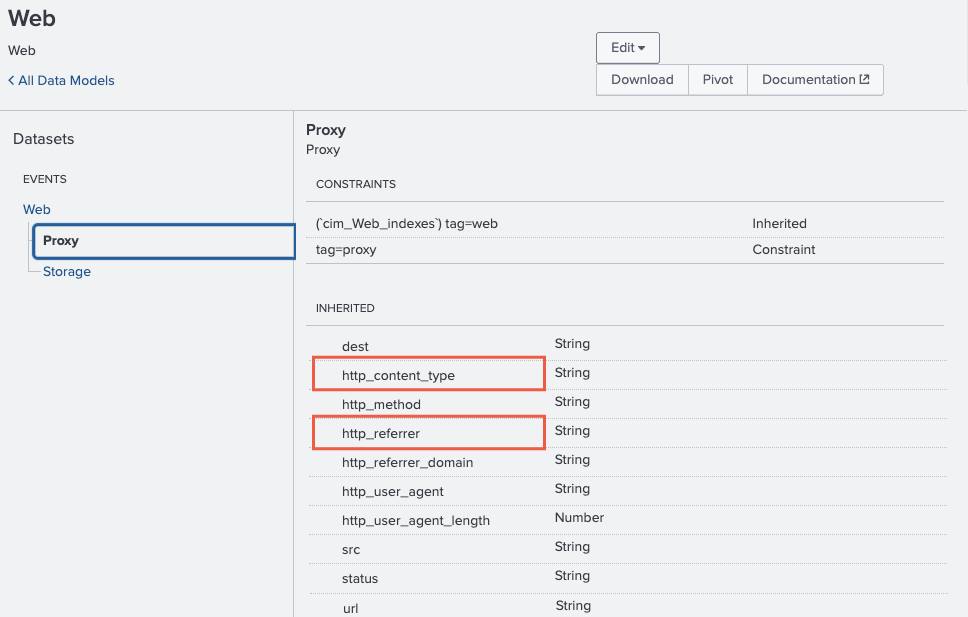
The following screenshots show where the CIM Web data model field names (dest, http_method, src, etc.) appear in the Splunk interface.
When mapping data model fields, use the Field name, not the Display name you can set when you edit a data model field.
The first screenshot shows the parent Web dataset, and the second shows the child Proxy dataset.
View detailed field mappings
The filters and mappings work as follows.
Web data model: Web dataset
index=main AND sourcetype=access_combined
| Lumi event field | Data model field |
|---|---|
clientip | Web.src |
uri_path | Web.url |
host | Web.dest |
source | Web.source |
status | Web.status |
method | Web.http_method |
useragent | Web.http_user_agent |
user | Web.user |
Web data model: Web dataset: Proxy child dataset
Child datasets combine their own filter with the parent's filter using AND, and inherit the parent's field mappings while adding their own.
host=proxy-01 AND index=main AND sourcetype=access_combined
| Lumi event field | Data model field |
|---|---|
referer | Web.Proxy.http_referrer |
Learn more
See the following topics for more information:
- Query Lumi events with data models for an overview of how Lumi resolves data model queries.
- How to query Lumi using a Splunk data model to walk through data model setup and run example queries.
- Troubleshoot data model queries if your queries return zero or inconsistent results.
- IAM key attribute reference for details on IAM key attributes.