Query Lumi events with data models
AI summary
About AI summaries.
Data models in Splunk® provide a structured way to organize and search data using standardized field names. This topic provides an overview of how Imply Lumi integrates with Splunk data models and how to query Lumi events with them.
To use data model queries, you need to complete the transparent federated search setup and then configure your IAM key with a data model attribute. See Set up transparent federated search for setup instructions and Configure Lumi for data model queries for the IAM key configuration.
Lumi resolves data model queries in different ways depending on data model acceleration and the query method.
Workflow
The following workflow describes how Splunk uses data models to query data in Lumi.
This workflow applies when Splunk sends Lumi a data model query: tstats FROM datamodel searches, and Splunk Pivot queries on accelerated data models.
For non-accelerated Pivot reports and datamodel commands, Splunk expands the data model definition into a search with no data model reference, and Lumi doesn't perform the field name translation in steps 3 and 4.
See Data model acceleration for details.
- A user performs a local query in Splunk or runs a Pivot report using a data model (for example, the Common Information Model (CIM) Web data model).
- A transparent federated provider routes the query to Lumi.
- Lumi translates the data model field names to its own field names using field mappings on the IAM key.
- Lumi returns results to Splunk with field names translated back to match the data model.
- In Splunk, the user sees results combined from both Splunk and Lumi.
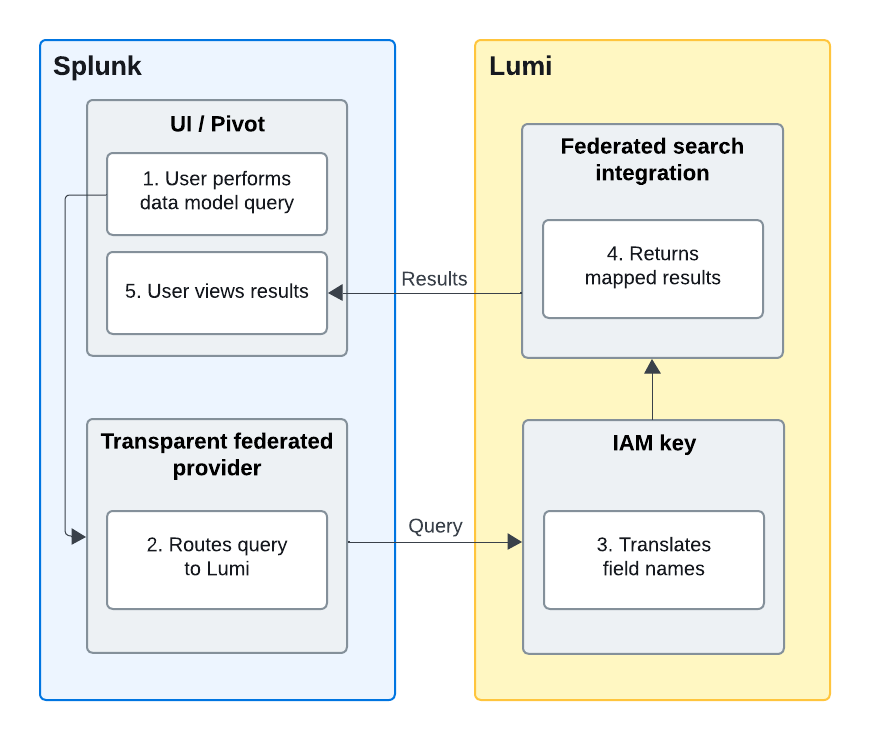
See the example workflow for more detail.
Data model acceleration
You can query Lumi with both accelerated and non-accelerated data models. Acceleration changes how Splunk sends some queries to Lumi and which requirements apply. If you're using Splunk Pivot, we recommend accelerating the data model. Non-accelerated Pivot queries are subject to the allowed indexes condition.
How Lumi resolves data model fields depends on the form in which Splunk sends the query:
- Data model query: Splunk sends the query with the data model reference intact. Lumi resolves data model fields using the data model attribute on the IAM key. The Splunk data model definition only needs to declare the expected fields. Lumi determines how to calculate them.
- Expanded search: Splunk expands the data model definition inline before sending the query.
Constraints become search filters and calculated fields become
evalexpressions, so the query Lumi receives is an SPL search with no data model reference. Lumi doesn't use the data model attribute—both the fields and how they're calculated come entirely from the Splunk data model definition.
The query form depends on how you query the data model and whether it's accelerated:
| Query method | Accelerated | Not accelerated |
|---|---|---|
tstats FROM datamodel | Data model query | Data model query |
| Pivot report | Data model query | Expanded search |
datamodel command | Expanded search | Expanded search |
The same search can return different results depending on the query form because different definitions apply to each form.
For example, if the Splunk definition calculates a field from ip but the Lumi data model attribute maps it to host, a Pivot report returns different results depending on acceleration.
To keep results consistent across query forms, map each data model field to a Lumi field that contains the same values the Splunk definition produces. For calculated fields, this can mean transforming your data at index time using Lumi pipelines.
Expanded searches and allowed indexes
When Splunk sends an expanded search, Lumi checks the query against the Allowed indexes setting on the IAM key. Because Lumi doesn't use the data model attribute for expanded searches, the index must be identifiable from the query itself.
One of the following conditions must be met:
- The allowed indexes setting on the IAM key used for federated search is set to All, or
- Both of the following are true:
- The Splunk data model definition specifies an index in its constraints.
- That index is listed in the Allowed indexes setting.
If neither condition is met, Lumi rejects the query as out of scope, causing empty results.
The index in the Splunk data model constraints satisfies the index condition, not the index in the filter property of the Lumi data model attribute.
Lumi doesn't read the data model attribute for expanded searches.
Query considerations
This section describes SPL syntax requirements to keep in mind when you write data model queries against Lumi.
Commands that follow a data model clause
Any SPL command that follows a FROM datamodel clause must use the data model field names, not the Lumi-native field names.
Whether to enclose the field name in single quotes depends on the command:
- In commands that take
evalexpressions, such aswhereandeval, enclose the field name in single quotes. Without quotes, SPL treats the dot as the concatenation operator and the field doesn't resolve. - In
BYclauses andfieldslists, use the bare field name. Single quotes there become part of the field name, which then doesn't match anything.
This means the same field name is often quoted in one part of a query and bare in another. For example:
| tstats count FROM datamodel=Web.Web BY Web.http_method
| where 'Web.http_method'="GET"
Quoting incorrectly in either direction returns zero results rather than an error.
Child dataset queries
The FROM datamodel= clause accepts only the data model name and root dataset.
To query a child dataset, filter on nodename. For example:
| tstats count FROM datamodel=Web.Web WHERE nodename=Web.Proxy
This returns events that match the child dataset's filter combined with its parent's filter. For details on how child dataset filters combine, see Field mapping example.
Example workflow
In this example scenario, a user wants to investigate a spike in 500 errors on GET requests to a specific web server. They want to filter results from the past hour to identify whether there's a current service issue.
This example uses an accelerated data model. See Data model acceleration for details.
1. User creates a report in the Pivot UI
The user selects the Web data model and builds a Pivot report with the following filters:
dest=web-prod-01status=500http_method=GET- Time range: Last hour
Behind the scenes, Splunk creates a query like:
| tstats count FROM datamodel=Web.Web WHERE Web.dest="web-prod-01" Web.status=500 Web.http_method=GET earliest=-1h BY Web.http_method
2. The transparent federated provider passes the query to Lumi
The transparent federated provider routes the query to Lumi with the data model field names: Web.dest, Web.status, Web.http_method.
3. Lumi translates field names
Lumi receives the query and uses the IAM key mapping to translate the incoming field names:
Web.dest→hostWeb.status→statusWeb.http_method→method
Note that status uses the same field name in both Lumi and the data model, but must still be included in the field mapping to appear in query results.
See Field mapping for details.
Lumi executes the query using its native field names: host, status, method.
After retrieving matching events, Lumi translates the field names back to what the data model expects:
host→Web.deststatus→Web.statusmethod→Web.http_method
4. Lumi returns mapped results
Lumi returns events with field names matching the Web data model specification: Web.dest, Web.status, Web.http_method.
5. Splunk displays results
The Pivot report displays results from both Lumi and local Splunk indexes, with all events using consistent Web data model field names.
Learn more
See the following topics for more information:
- Configure Lumi for data model queries to set up the IAM key data model attribute and field mappings.
- How to query Lumi using a Splunk data model to walk through data model setup and run example queries.
- Troubleshoot data model queries if your queries return zero or inconsistent results.
- Accelerate data models in the Splunk documentation for details on acceleration.