Enrich Lumi events with Splunk lookups
AI summary
About AI summaries.
Lookups in Splunk® let you enrich search results with data from external sources, such as a CSV file that maps usernames to roles or IP addresses to locations. This topic explains how to extend an existing Splunk lookup to enrich Imply Lumi events through transparent federated search.
Lumi supports CSV lookups, in both standard (.csv) and compressed (.csv.gz) formats, and key-value (KV) store lookups.
Both work the same way over federated search.
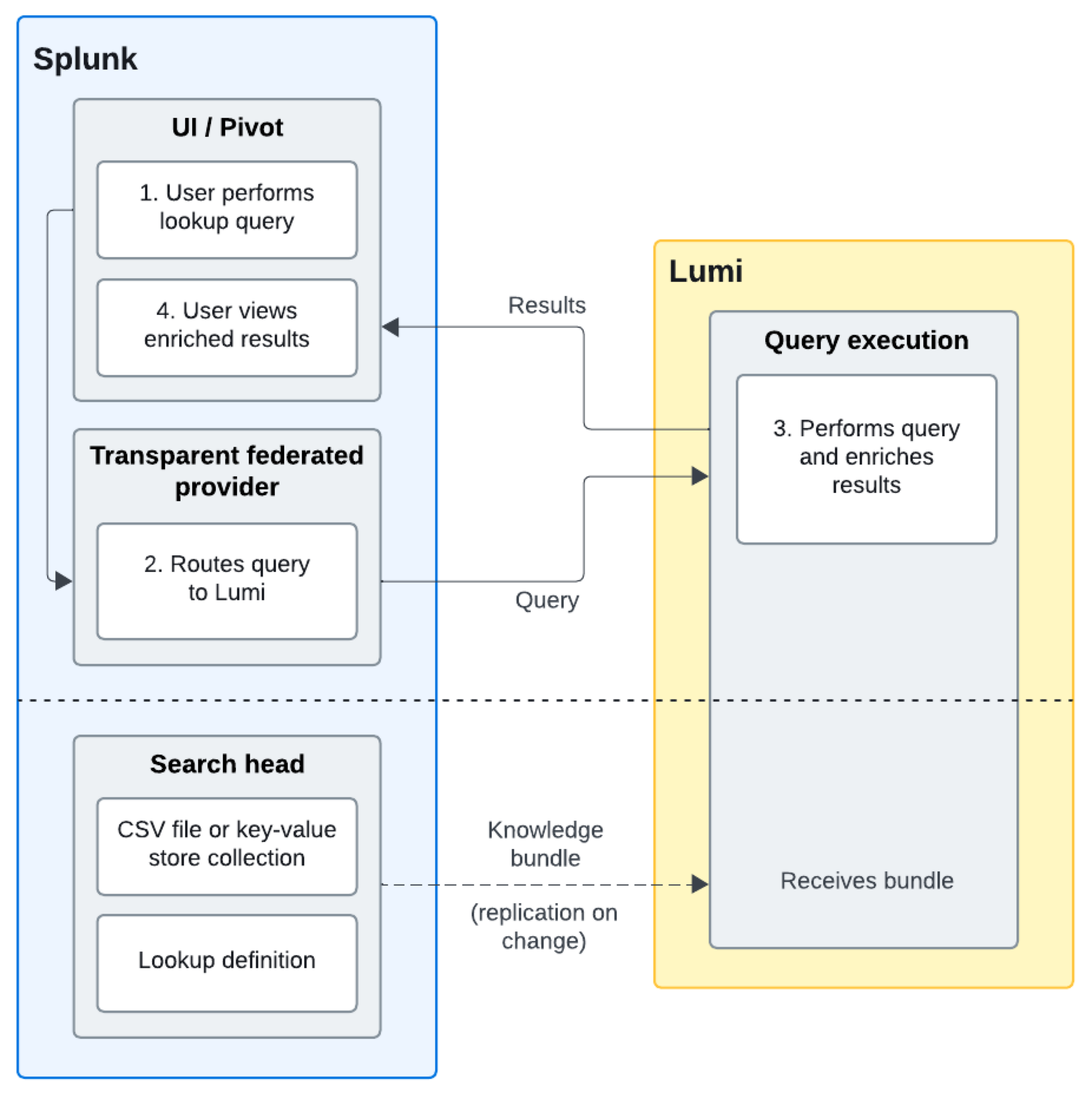
Splunk propagates lookup definitions, CSV files, and KV store collections to Lumi through knowledge bundle replication, and Lumi performs the enrichment.
Workflow
The following workflow describes the lookup and enrichment process. It assumes that a Splunk admin has configured a CSV or KV store lookup in Splunk.
- A user runs a query in Splunk that includes a lookup command.
- The transparent federated provider routes the query to Lumi.
- Lumi performs the lookup enrichment using the data propagated from Splunk, and returns enriched events to Splunk.
- In Splunk, the user sees results combined from both Splunk and Lumi.
Example lookup
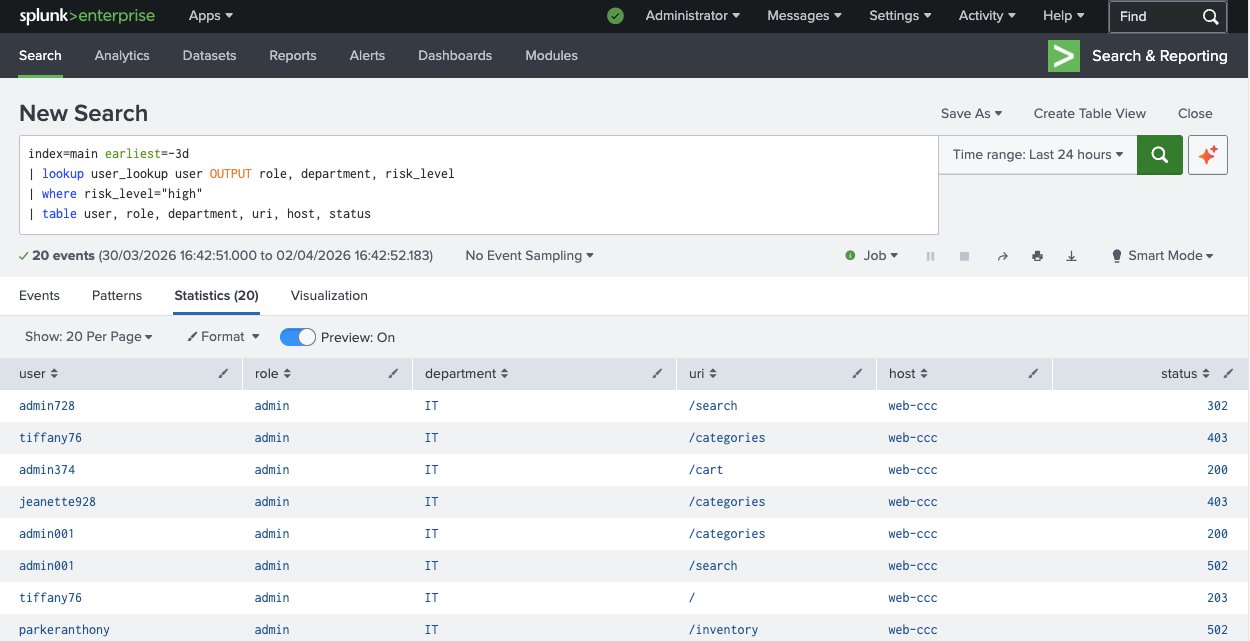
In this example, a security analyst wants to investigate web traffic from high risk users.
The Lumi events contain web access logs with a user field.
A CSV file (user_lookup.csv) is uploaded into a lookup table and associated with the user_lookup definition in Splunk.
It maps usernames to role, department, and risk_level.
The analyst runs the following query in Splunk:
index=main earliest=-3d
| lookup user_lookup user OUTPUT role, department, risk_level
| where risk_level="high"
| table user, role, department, uri, host, status
Lumi receives the query through the transparent federated provider, performs the lookup enrichment using the data propagated from user_lookup.csv, and returns enriched events to Splunk.
The analyst sees only events where risk_level is high, with full user context from the lookup.
Example results:
Enrich IP addresses with location
To enrich events with location data from IP addresses, you can use the iplocation command instead of a lookup.
It extracts location information using the geolocation database supported by Splunk, so it doesn't need a lookup table or collection.
See the Splunk command reference for more information.
Lumi requirements
The fields you're matching on must exist in your Lumi events. Knowledge bundle replication propagates the lookup to Lumi, but doesn't create or extract fields. If the match field isn't present in your Lumi events, the lookup returns no results. If the field doesn't exist in your Lumi events, you can use a pipeline to extract or rename it at index time.
Splunk requirements
This section details the Splunk configurations required to use lookups against Lumi.
Transparent mode
Lookups are only supported with transparent federated search. They don't work with standard mode federated search.
KV store lookups
KV store lookups work the same way as CSV lookups over federated search.
Knowledge bundle replication copies the collection to Lumi as CSV data, and Lumi performs the enrichment, so you don't need local=true or any change to the lookup command.
KV store lookups additionally require the following:
- The collection referenced by the lookup name must live in the same app as the lookup definition (the
transforms.confthat defines it). - Multivalue fields aren't supported. A KV store lookup that matches on a multivalue field returns an error.
Lookup permissions
You must share both the lookup definition and its data in Splunk. Set the permissions to one of the following:
- This app only
- All apps (system)
If either is set to Keep private, the lookup won't work with federated search.
The objects that need permissions depend on the lookup type:
- CSV: Lookup table file, plus lookup definition if you reference the lookup by name.
If you reference the CSV file directly by filename instead (for example,
lookup user_lookup.csv user OUTPUT role), you only need the lookup table file. - KV store: KV store collection and lookup definition. Private (user-level) KV store collections aren't replicated to Lumi, so the collection must be shared at the app or system level.
Note that Lumi doesn't enforce Splunk role-based permissions when it enriches events. Over federated search, a lookup set to This app only is queryable by any user via any Splunk app, regardless of their Splunk role. Keep this in mind when you set permissions.
Using lookups with data models
You can combine a lookup with a data model query. When you do, you must specify the data model field names in the lookup command. Lumi uses the IAM key mapping to translate field names to data model names before running the lookup, but doesn't automatically apply those translations to the lookup command. If you use Lumi-native field names in the lookup command, the lookup won't find them.
For example:
| tstats count FROM datamodel=Web.Web WHERE Web.status=500 by Web.user
| lookup user_lookup user AS 'Web.user' OUTPUT role, department, risk_level
Learn more
See the following topics for more information:
- Set up Splunk transparent federated search to set up a transparent federated provider in Splunk.
- Query Lumi events with data models to query Lumi events from Splunk using a data model.
- Use lookups with KV store data in the Splunk docs.