Set up Splunk transparent federated search
AI summary
About AI summaries.
Transparent mode federated search lets you query Imply Lumi events from Splunk® without the federated: prefix.
This makes it easier to integrate Lumi data into existing Splunk queries and workflows.
For an overview of standard and transparent modes and guidance on which to choose, see Search events with Splunk.
Prerequisites
To set up transparent federated search, you need a Lumi user with the Viewer role or higher. For information on roles and permissions, see Use roles to control access.
Configure a Lumi IAM key
You configure a Lumi IAM key to authenticate to Splunk and translate between Splunk data model fields and Lumi event fields. If you add multiple federated providers, you must create a separate key for each one.
To set up the IAM key:
- From the Lumi navigation menu, click Integrations > Federated search.
- Select Transparent.
- Select or create an IAM key. See Create an IAM key for details.
- Configure the allowed indexes.
- Configure the query timeout.
- (Optional) If you want to search using data models, configure the data model attribute.
- Save your changes.
Configure allowed indexes
The allowed indexes setting on the IAM key controls which Lumi indexes can be queried for non-data model queries.
In the Allowed indexes field on the IAM key, set one of the following options:
- All: Query all indexes without restrictions. We recommend using Enter specific to control query scope and reduce load.
- None: Block direct queries to indexes. Data models can still reference indexes through field mapping filters.
- Enter specific: Enter the names of specific Lumi indexes to enable for queries.
The allowed indexes setting only applies to non-data model queries. Data model queries are not affected by the allowed indexes setting.
When you select None or Enter specific for allowed indexes, you must include an explicit index in non-data model queries. When you select All, you can query without specifying an index.
For example, if main is explicitly allowed, sourcetype=access_combined status=500 returns empty results. Instead, use index=main sourcetype=access_combined status=500.
Configure query timeout
The query timeout setting on the IAM key controls how long a query can run before it's automatically canceled.
In the Query timeout field on the IAM key, choose a timeout value between 5 and 60 minutes.
Add a federated provider
A transparent federated provider in Splunk routes queries to Lumi.
To configure the provider:
- In Splunk Web, go to Settings > Federation > Federated Providers > Add federated provider.
- Select Splunk then click Next.
- Complete the following fields:
- Provider mode:
Transparent. - Provider name: Name that you'll reference in the federated index. Must be lowercase, for example
lumi-prod. - Remote host: Lumi host address prefixed by your IAM key ID, for example
8ee97d51-97f8-4c51-b44a-4b5bd7175abc.us1.spl.lumi.prod.imply.io:443. Copy the full value from the Lumi UI. - Service account username: IAM key ID from the Lumi UI.
- Service account password: IAM key token from the Lumi UI.
- Provider mode:
- Select the Agree checkbox and test the connection.
- Once the connection is successful, click Save.
Note that you don't need to create a federated index for a transparent provider. The provider routes queries to Lumi based on the allowed indexes configuration.
Search for events
Once you configure the transparent federated provider and Lumi integration, you can query Lumi events directly or using a data model.
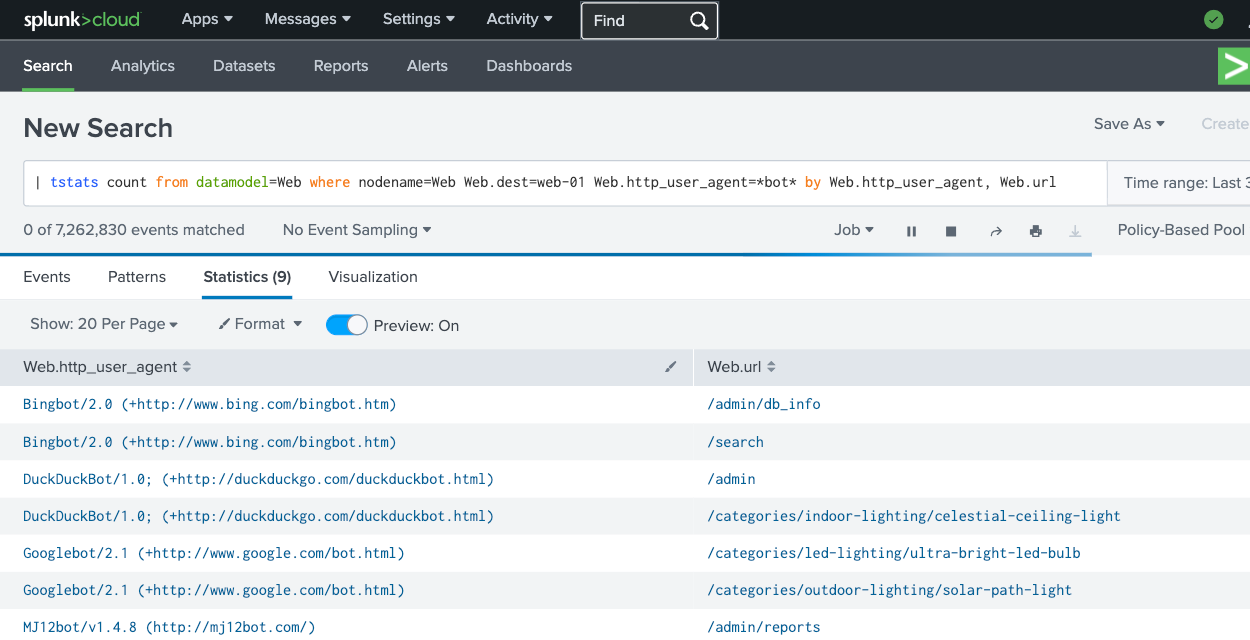
The following example finds bot activity on web-01:
| tstats count from datamodel=Web where nodename=Web Web.dest=web-01 Web.http_user_agent=*bot* by Web.http_user_agent, Web.url
In this query, nodename=Web specifies the Web dataset, and Web.dest (which maps to the host field in Lumi) filters for web-01.
Example results:
Search child datasets
To query a child dataset, use the nodename parameter to specify the child dataset path.
For example, to query the Proxy child dataset within the Web data model:
| tstats count from datamodel=Web where nodename=Web.Proxy Web.Proxy.http_referrer=*google* by Web.dest, Web.http_user_agent, Web.url
This query counts proxy web traffic from Google, grouping by destination server, user agent, and URL.
Child dataset fields use the Web.Proxy. prefix, while inherited fields use the Web. prefix.
For complete tstats syntax and examples, see the Splunk tstats documentation.
Learn more
See the following topics for more information:
- Query events with data models for an overview of the data model query workflow.
- Federated search reference for supported SPL commands and syntax.
- Federated search examples for sample queries with example output.
- Set up Splunk standard federated search to set up standard federated search.