How to query Lumi using transparent federated search
AI summary
About AI summaries.
After sending, transforming, and indexing your events, you can use Splunk® transparent federated search to query Imply Lumi events with SPL.
Transparent mode doesn't require the federated: prefix when searching, which is useful when you want to retrieve both Splunk and Lumi results with a single query.
It allows you to query using data models and enrich Lumi results with lookups.
See Choosing a mode for information on selecting standard or transparent mode to query Lumi events.
The following diagram shows where this tutorial fits in the end-to-end process of sending, transforming, and querying events. Yellow shaded boxes represent steps taken within Lumi, and blue shaded boxes represent steps taken outside Lumi. Click any box to go to that tutorial.
This tutorial builds on the Quickstart and walks you through how to:
- Configure transparent federated search to connect Splunk to Imply Lumi.
- Perform federated queries on Lumi events.
The steps assume that, as part of the Quickstart, you've already:
- Added web logs to Lumi using the file upload feature.
- Viewed and queried events in Lumi.
To complete the steps, you use sample web traffic data from a fictional online store. For background on the dataset and its format, see the tutorial data overview.
The following diagram summarizes the end-to-end process of searching events with Splunk. Yellow shaded boxes represent steps taken within Lumi, and blue shaded boxes represent steps taken outside Lumi. Click any box in the diagram to jump to that step.
Prerequisites
Before you begin, download an up-to-date version of the sample log file and upload it to Lumi.
To complete the tutorial, you need the following:
- Access to Lumi with the Viewer role or higher.
For information on roles and permissions, see Use roles to control access. - A Lumi IAM key with the federated search integration.
See Create an IAM key for details. - A Splunk user with the
admin_all_objectsandindexes_editcapabilities. The following roles have these capabilities by default. See the Splunk documentation on security for federated search for more information.- Splunk Cloud:
sc_admin - Splunk Enterprise:
admin
- Splunk Cloud:
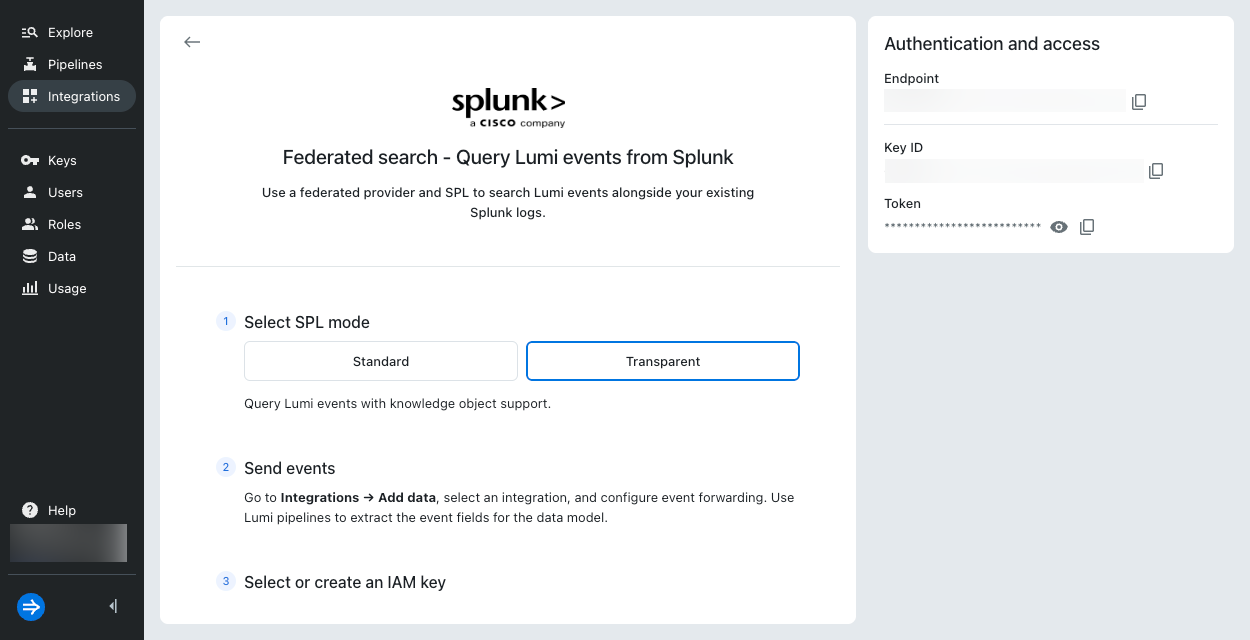
1. Retrieve details from Lumi
In this step, you retrieve the information you need from Lumi.
- In Lumi, go to Integrations > Federated search.
- Select Transparent SPL mode.
- Click Select or create key.
- Select your IAM key in the drop-down menu and click Select. Lumi automatically enables the key for the federated search integration.
- Copy the Remote host, Service account username, and Service account password. You'll need these details in the next step. Note that the remote host value is your Lumi host address prefixed by your IAM key ID, for example
8ee97d51-97f8-4c51-b44a-4b5bd7175abc.us1.spl.lumi.prod.imply.io:443.
2. Create a transparent federated provider
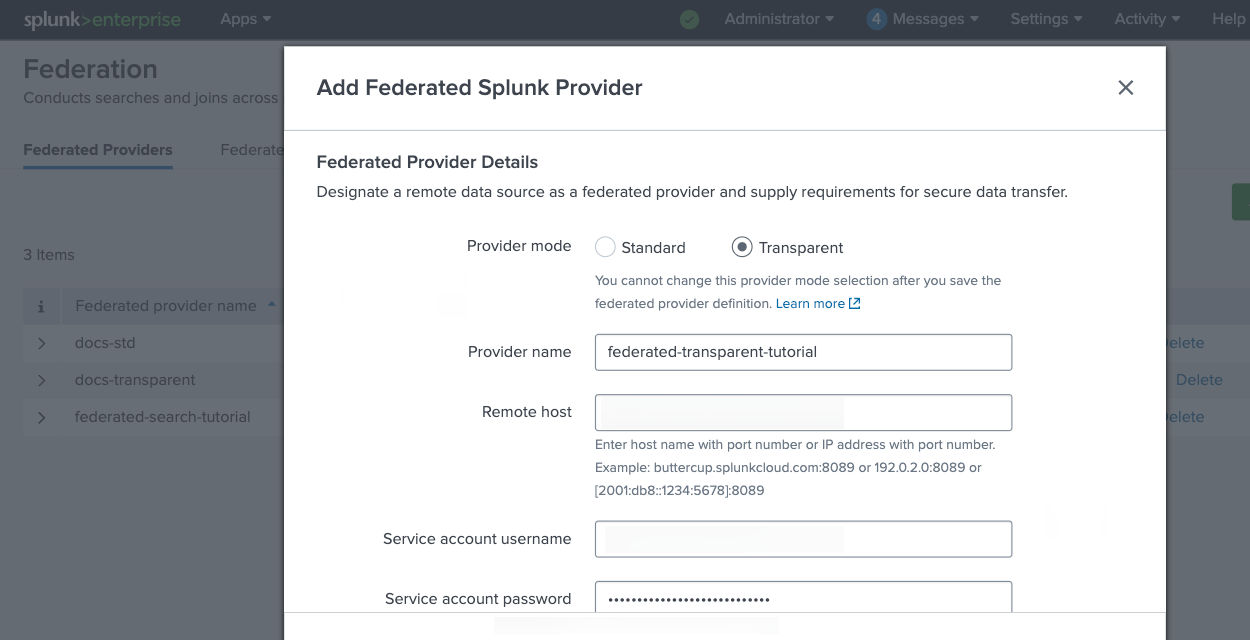
In this step, you add Lumi as a transparent federated provider in Splunk. Unlike standard mode, you don't need to create a federated index. Splunk routes queries to Lumi automatically through the provider.
- In Splunk Web, go to Settings > Federation > Federated Providers > Add federated provider.
- Select Splunk, then click Next.
- Complete the following fields:
- Provider mode:
Transparent. - Provider name:
federated-transparent-tutorial. Must be lowercase. - Remote host: Your Lumi host address.
- Service account username: IAM key ID you copied in the previous step.
- Service account password: IAM key token you copied in the previous step.
- Provider mode:
- Leave all other fields unchanged and click the Agree checkbox.
- Test the connection.
- Once the connection is successful, click Save.
- In the federated providers list, find
federated-transparent-tutorialand set its status to Active. Important: Deactivate any other federated providers to this Lumi source. You can only have one active at a time.
3. Test federated search
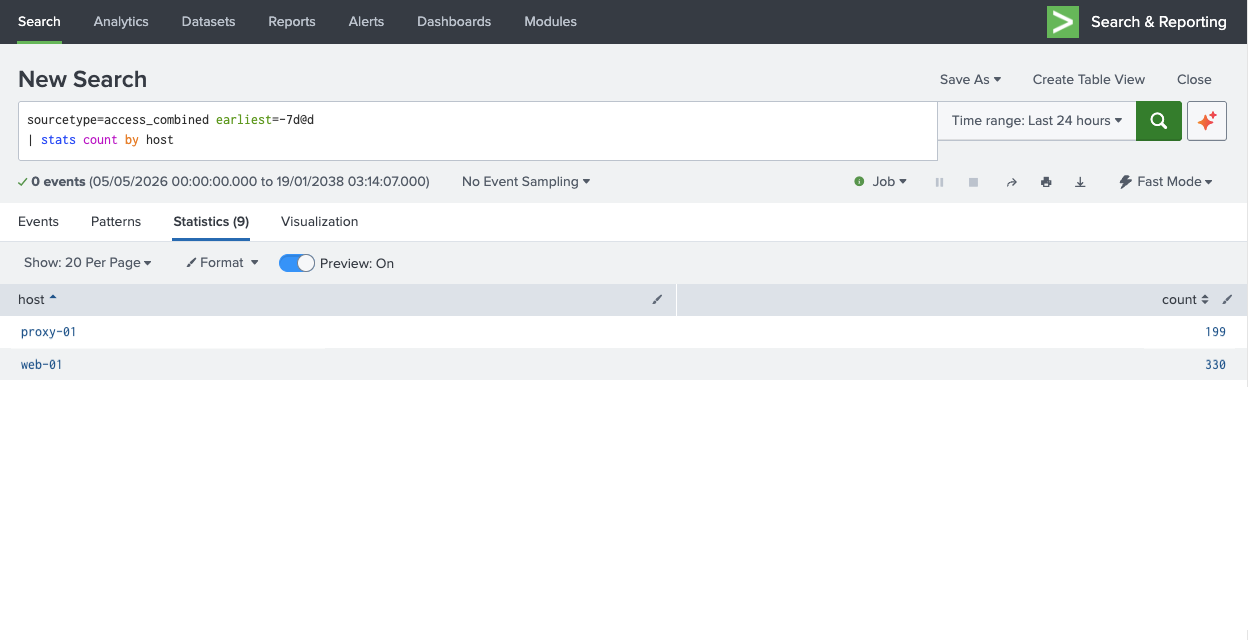
In this step, you confirm that transparent federated search is returning events from Lumi.
-
In Splunk Web, go to the Search & Reporting app.
-
Set the time range to the last 7 days. You can also include
earliest=-7d@din the query as shown below, which overrides the time range selector. -
Run the following query:
sourcetype=access_combined earliest=-7d@d host IN (web-01,proxy-01)| stats count by hostYou should see results for the two hosts in the sample log file:
4. Run federated queries
In this step, you run a series of queries to explore traffic patterns in the Lumi sample data.
The example output may not exactly match yours. The queries use a relative 7-day time range, and the sample data has fixed timestamps, so results depend on when you downloaded the file.
-
Count requests by HTTP method and host:
sourcetype=access_combined earliest=-7d@d host IN (web-01,proxy-01)| stats count by host method| sort host methodExample output:
hostmethodcountproxy-01DELETE42proxy-01GET54proxy-01POST50proxy-01PUT53web-01DELETE83web-01GET67web-01OPTIONS1web-01POST89web-01PUT89 -
Count error responses (status 500 or higher) by host:
sourcetype=access_combined earliest=-7d@d host IN (web-01,proxy-01)| where status >= 500| stats count by hostExample output:
hostcountproxy-0124web-0122 -
Show the top 5 pages by request count across all sources:
sourcetype=access_combined earliest=-7d@d host IN (web-01,proxy-01)| top uri_path limit=5Example output:
uri_pathcountpercent/cart7213.615086/468.695652/search315.860113/categories/indoor-lighting/aurora-chandelier213.969754/checkout203.780718 -
Compare average response size by host:
sourcetype=access_combined earliest=-7d@d host IN (web-01,proxy-01)| stats avg(bytes) as avg_bytes by host| eval avg_bytes = round(avg_bytes, 2)Example output:
hostavg_bytesproxy-014993.58web-014948.03 -
Find all error responses for a specific user across all sources:
sourcetype=access_combined earliest=-7d@d host IN (web-01,proxy-01)| where status >= 400| where user = "gusosborne"| table _time host status method uri_path| sort _timeExample output:
_timehoststatusmethoduri_path2026-05-11 21:43:27web-01403DELETE/2026-05-07 00:00:53web-01403GET/categories/smart-lighting/app-controlled-lamp2026-05-08 12:10:28proxy-01401GET/categories/led-lighting/ultra-bright-led-bulb
Learn more
To build on this tutorial, see:
- How to query Lumi using standard federated search to walk through standard federated search setup and example queries.
- Search events with Splunk for details on configuring federated search of Lumi events within Splunk.