Send AWS CloudTrail events to Lumi
This topic guides you through how to send AWS CloudTrail events to Imply Lumi using various ingestion integrations.
You can use your own CloudTrail logs or follow along with this guide using example logs from CloudTrail Insights.
You can also download the example data file cloudtrail_insights.json.
For details about how Lumi transforms CloudTrail events, see event splitting and the predefined pipeline reference.
Prerequisites
To send AWS CloudTrail events to Lumi, you need the following:
- Access to Lumi with the Data manager role or higher. For information on roles and permissions, see Use roles to control access.
- The prerequisites for the ingestion integration you use.
File upload
To upload AWS CloudTrail logs:
- Select Integrations in the navigation menu.
- Select File upload.
- Click Select file and select your file.
- Confirm that Lumi automatically detected the JSON format.
- In Source type, enter
aws:cloudtrail. - View in the Parsed preview how Lumi automatically splits the events.
Select any event from the preview to see the extracted key-value pairs.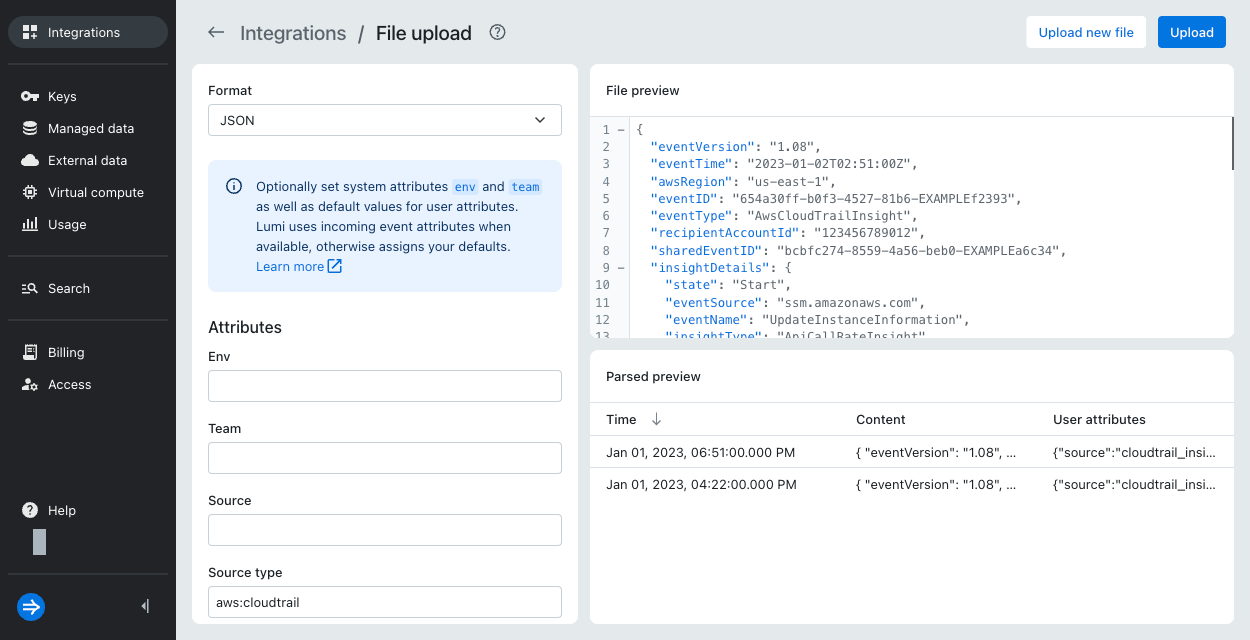
- Optionally, fill out the system and user attributes.
- Click Upload.
- Click Go to Explore in the confirmation dialog to view the ingested events.
Lumi automatically applies search filters for your filename and time range.
S3 backfill
To backfill AWS CloudTrail logs:
- Select Integrations in the navigation menu.
- Select AWS CloudTrail logs.
- For the job type, select Backfill.
- Configure your AWS permissions for Lumi.
- Create or select an IAM key.
- If you create a new key, Lumi automatically assigns the source type
aws:cloudtrail. - If you select an existing key, click Go to key to view the key attributes. If you don't have the correct source type, click the ellipsis menu next to the S3 pull integration and select Edit attributes. Fill in
aws:cloudtrailfor Source type.
- If you create a new key, Lumi automatically assigns the source type
- Load the CloudTrail logs into your bucket.
- Complete the steps to create the S3 backfill job.
- Follow the steps to view ingested events.
Splunk HEC
Over Splunk HEC, Lumi doesn't split a CloudTrail Records array. Send each CloudTrail record as its own HEC event.
The following configuration shows how to split AWS CloudTrail events in an OTel collector before sending them to Lumi.
Note that the unroll block in the configuration requires the contributor distribution of the OTel collector.
For installation instructions, see the tutorial.
To use the example, replace the variables with your own values:
IAM_KEY_TOKEN: IAM key token provided by Lumi.
For example,229a2561-0000-0000-0000-bc433de16f89LUMI_ENDPOINT: Lumi HEC endpoint.
For example,https://splunk-hec.api.lumi.imply.io/services/collector
receivers:
  otlp:
    protocols:
      http:
        endpoint: 0.0.0.0:4318
        # Listens for OTLP/HTTP log payloads on all interfaces, port 4318.

processors:
  memory_limiter:
    check_interval: 1s
    limit_mib: 512
    # Safety valve to check memory usage every second to prevent OOM crashes.

  transform/cloudtrail:
    # Parse incoming batch of CloudTrail events in JSON format.
    # Results in a list of CloudTrail events extracted from "Records".

    error_mode: ignore
    # Skip any OTTL errors (bad cast, missing field, etc.) and continue processing.

    log_statements:
      - conditions:
          - IsString(log.body) and IsMatch(log.body, "^\\s*\\{\\s*\"Records\"\\s*:\\s*\\[")
        statements:
          - set(log.body, ParseJSON(log.body)["Records"])
        # Parses JSON if the log body is a raw JSON string AND looks like a CloudTrail
        # delivery file. Applies when the upstream sender didn't pre-parse the payload.

      - conditions:
          - IsMap(log.body) and IsList(log.body["Records"])
        statements:
          - set(log.body, log.body["Records"])
        # Unwraps the JSON envelope if the log body is already decoded JSON and has the
        # "Records" list. Applies when the upstream sender already parsed the JSON.

  unroll:
    recursive: false
    # Splits a log record whose body is a list into N separate log records.

  transform/cloudtrail_time:
    # For each log, extract and assign the timestamp from the CloudTrail event.
    # Assign the aws:cloudtrail source type.

    error_mode: ignore
    log_statements:
      - conditions:
          - IsMap(log.body) and IsString(log.body["eventTime"])
          # Only act on records that are a map and have an "eventTime" string field.
        statements:
          - set(log.time, Time(log.body["eventTime"], "%Y-%m-%dT%H:%M:%SZ"))
            # Assign log timestamp from the CloudTrail ISO 8601 timestamp.
          - set(log.attributes["com.splunk.sourcetype"], "aws:cloudtrail")
            # Assign the aws:cloudtrail source type. Overrides the default value "otel".

  batch:
    timeout: 1s
    # Export records when the batch is full or after 1 second, whichever comes first.

exporters:
  splunk_hec:
    endpoint: LUMI_ENDPOINT
    token: IAM_KEY_TOKEN
    source: otel-collector
    sourcetype: otel   # Default sourcetype for records from this exporter. Applies
                       # to logs that don't go through the CloudTrail transforms.

service:
  pipelines:
    logs:
      receivers: [otlp]
      processors: [memory_limiter, transform/cloudtrail, unroll, transform/cloudtrail_time, batch]
      exporters: [splunk_hec]
The event that arrives in Lumi has the following structure:
- Log body: native CloudTrail record
- Timestamp:
eventTimefrom CloudTrail log - Source type:
aws:cloudtrail - Receiver:
splunk.hec
You can also use a similar configuration for the OTLP integration. Modify the OTel configuration as follows:
- Replace the
splunk_hecexporter with anotlphttpexporter. For the endpoint and authorization header, see the OTel collector example. - Assign the source type to the
sourcetypeattribute instead ofcom.splunk.sourcetype:set(log.attributes["sourcetype"], "aws:cloudtrail")
The OTel extension awslogs_encoding/cloudtrail is incompatible with splunk_hec. The processing splits events and extracts attributes but leaves an empty log body so the exporter silently drops the events.
Learn more
- Event splitting to learn how Lumi splits events by source type.
- Event formats for supported event formats.
- Send events with the OTel collector for a tutorial on using the OTel collector.