Event source integrations reference
AI summary
About AI summaries.
This topic provides a reference for the event source integrations available in Imply Lumi. Go to Integrations and see the Connect sources section for integrations that accommodate specific logs and event structures:
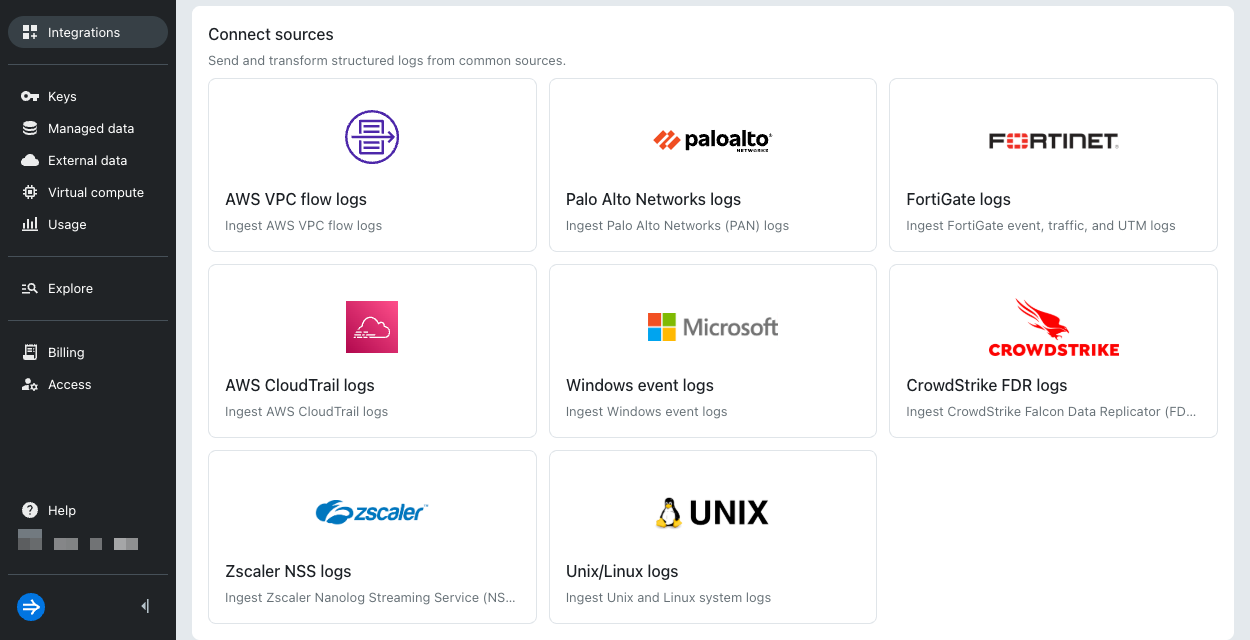
Each integration guides you through configuring a transport mechanism to send a specific log type and has an analogous predefined pipeline that processes the events.
Each section in this topic lists the following information:
- Receivers: Transport mechanisms you can configure on the integration page.
- Source type assignment: Value for the
sourcetypeuser attribute for event labeling and pipeline processing. - Predefined pipeline: Name of the pipeline created by Lumi to extract key information from your events. Select the predefined pipeline to view an example of the processed event.
A log type isn't limited to the listed receivers.
If you use another receiver, ensure that incoming events list the correct sourcetype so the predefined pipeline can transform them.
For ways to assign the source type, see Assign Splunk® default fields.
AWS CloudTrail logs
AWS CloudTrail events record actions taken in AWS accounts, including management, data, network activity, and insights events.
- Receivers: S3 pull
- Source type assignment:
aws:cloudtrail - Predefined pipeline: AWS CloudTrail logs
AWS VPC flow logs
Amazon VPC flow logs capture metadata about the IP traffic going to and from network interfaces in your Virtual Private Cloud (VPC). Because it's simple to configure AWS to send VPC flows to an S3 bucket, S3 pull is a popular option.
- Receivers: S3 pull, Splunk -
httpout, Splunk - HEC - Source type assignment:
aws:cloudwatchlogs:vpcflow - Predefined pipeline: AWS VPC flow logs
CrowdStrike FDR logs
CrowdStrike Falcon® is an endpoint security platform that generates logs for endpoint telemetry, detections, and Falcon sensor alerts. The Falcon Data Replicator (FDR) collects, enriches, and replicates the logs for use in observability workflows.
- Receivers: S3 pull, Splunk -
httpout, Splunk - HEC - Source type assignment:
crowdstrike:*, for examplecrowdstrike:events:sensor - Predefined pipeline: CrowdStrike FDR logs
FortiGate event logs
FortiGate event logs record system and administrative events, including admin logins, reboots, or VPN status.
- Receivers: S3 pull, Splunk -
httpout, Splunk - HEC - Source type assignment:
fgt_event - Predefined pipeline: FortiGate event logs
FortiGate traffic logs
FortiGate traffic logs record traffic flow information for the traffic that passes through FortiGate to your network.
- Receivers: S3 pull, Splunk -
httpout, Splunk - HEC - Source type assignment:
fgt_trafficorfortigate_traffic - Predefined pipeline: FortiGate traffic logs
FortiGate UTM logs
FortiGate UTM logs record security information from Unified Threat Management (UTM) events.
- Receivers: S3 pull, Splunk -
httpout, Splunk - HEC - Source type assignment:
fgt_utmorfortigate_utm - Predefined pipeline: FortiGate UTM logs
PAN firewall logs
Palo Alto Networks (PAN) Next-Generation Firewall logs store details about system events on the firewall and network traffic events that the firewall monitors. There are multiple formats of PAN firewall logs, each representing a specific event type, such as traffic, threat, or system events.
- Receivers: S3 pull, Splunk -
httpout, Splunk - HEC - Source type assignment: A PAN-specific value such as
pan:traffic. For the full list, see the pipeline conditions. - Predefined pipeline: PAN firewall logs
PAN Traps logs
Palo Alto Networks (PAN) Traps logs originate from the Traps endpoint detection and response agent, now part of Cortex XDR. Traps logs come in several formats (analytics, config, system, and threat) and track information including agent configuration and malware prevention events.
- Receivers: S3 pull, Splunk -
httpout, Splunk - HEC - Source type assignment: A Traps-specific value such as
pan:traps. For the full list, see the pipeline conditions. - Predefined pipeline: PAN Traps logs
Unix and Linux logs
Unix and Linux logs store information about events that occur on the operating system, such as system activity, kernel errors, and cron jobs.
- Receivers: S3 pull, Splunk -
httpout, Splunk - HEC - Source type assignment:
bash_historyorlinux_secure - Predefined pipeline: Unix and Linux logs
Windows event logs
Windows event logs capture events for the Microsoft Windows operating system and applications that run on it.
- Receivers: S3 pull, Splunk -
httpout, Splunk - HEC - Source type assignment: A Windows-specific value such as
WinEventLogorXmlWinEventLog. For the full list, see the pipeline conditions.
Unlike other log types, the Windows predefined pipeline also matches on Windows-specificsourcevalues, such assource=WinEventLog*.
If your events already carry thesourcemetadata, you don't need to assign a source type. - Predefined pipeline: Windows event logs
Zscaler NSS logs
Zscaler Nanolog Streaming Service (NSS) collects and forwards event logs from a Nanolog.
Lumi processes Web and Firewall logs from Zscaler NSS.
Incoming events must be in key-value pair format using the equality (=) separator. For example, log_subtype=nss_web.
- Receivers: S3 pull, Splunk -
httpout, Splunk - HEC - Source type assignment:
zscalernss-fworzscalernss-web - Predefined pipeline: Zscaler NSS logs
Learn more
See the following topics for more information:
- Integrate event data sources for an overview of event source integrations.
- Send events for information on transport mechanism integrations.
- Work with predefined pipelines for how to use and manage predefined pipelines.