External data overview
AI summary
About AI summaries.
External data is data that stays in your own Amazon S3 storage instead of being ingested into Imply Lumi. Use an external data connection for data you query occasionally that already lives in your S3. This might include archival logs, audit data, and data you want to keep under your own control.
Lumi indexes your data and writes the index to your S3 storage, then serves queries on demand through the virtual tier.
How an external data connection works
When you connect external data, you point Lumi at two S3 locations:
- A logs location that holds your source data. Lumi only reads from this location and never writes to it.
- An index location where Lumi writes its index of your data. Lumi reads from and writes to this location.
Lumi indexes your source data and writes the index to the index location. When you query external data, Lumi spins up a virtual compute pool and loads only the data needed to serve the query into virtual storage. These copies are temporary. Lumi holds them in virtual storage while the pool is active and discards them when the pool shuts down. Your source data and its index stay in your S3.
The following diagram shows how data and queries flow through an external data connection:
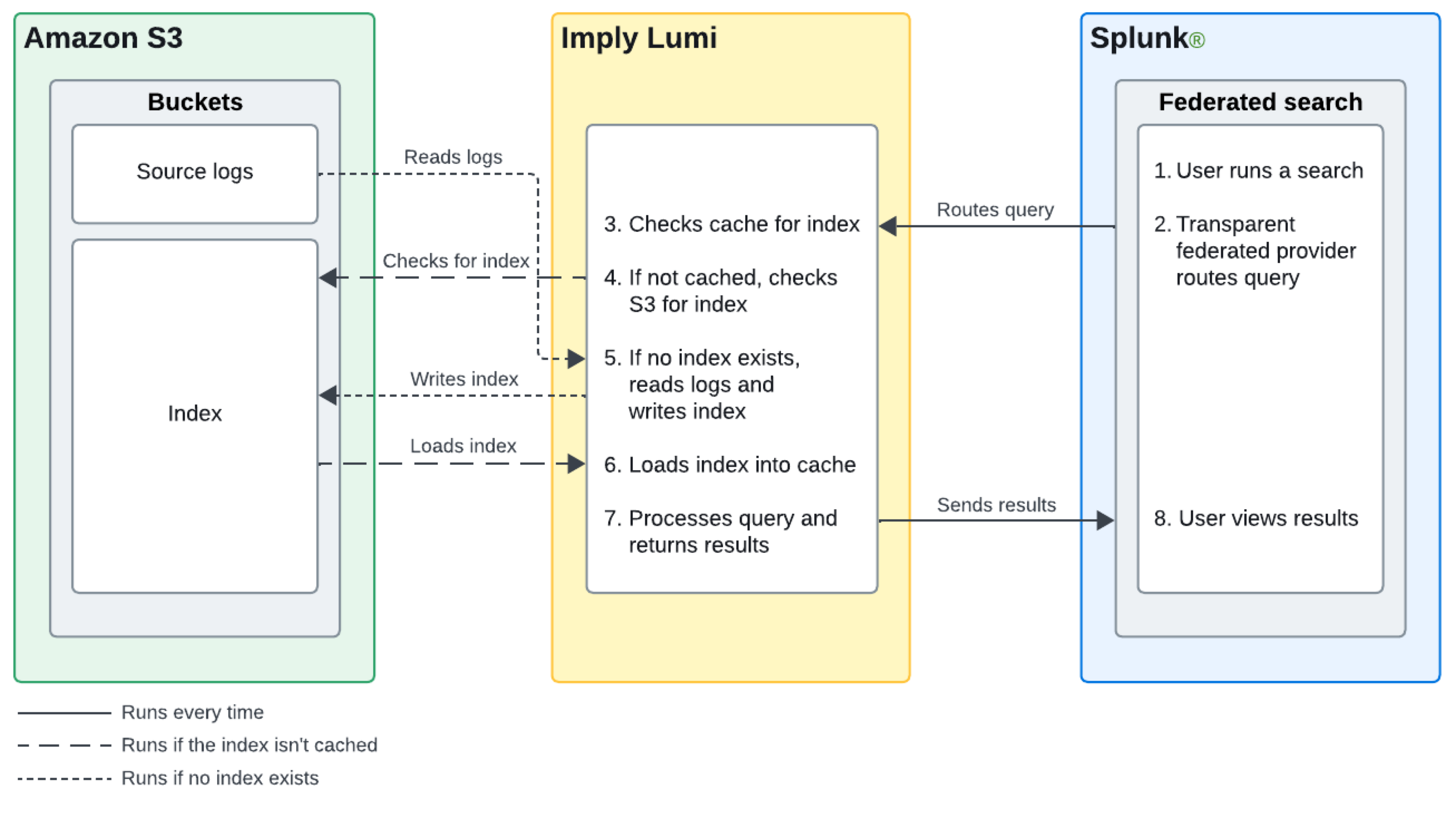
Lumi virtual tier is required for external data because it relies on virtual compute pools to serve queries. For information on how the virtual tier loads and serves data, see Virtual tier overview.
Deletion and tiering rules apply to managed data only, so they don't apply to external data.
When to connect external data
Lumi provides the following options for storing and querying data. Select an option based on how often you query the data and whether you want it in Lumi or in your own storage.
| Option | Best for | Where data lives | How you query it |
|---|---|---|---|
| Hot tier | Frequently accessed data that needs the lowest latency and highest concurrency | Ingested into Lumi | Lumi search, Splunk® federated search, and other query integrations |
| Virtual tier | Data you query infrequently, such as historical or archival data | Ingested into Lumi, evicted from the hot tier by tiering rules | Lumi search, Splunk federated search, and other query integrations |
| External data | Data you query occasionally and want to keep in your own storage | Stays in your S3, never ingested into Lumi | Lumi search and Splunk federated search |
Connect external data when it already lives in your S3 and you would rather keep it there than ingest it. Because your data stays in S3 for long-term storage, you can greatly reduce ingestion costs and the expense of keeping data in the hot tier.
You query external data through Lumi search or Splunk transparent federated search. Like any query served by the virtual compute pool, an external data query can incur a cold start while Lumi provisions compute or loads data into virtual storage. For the query steps, see Connect external data.
Learn more
For more information, see the following topics:
- Connect external data to set up a connection.
- Virtual tier overview for how the virtual tier serves queries against data outside the hot tier.
- Set up Splunk transparent federated search to query external data.