Manage tiering rules
AI summary
About AI summaries.
In Imply Lumi, tiering rules control when data moves out of the hot tier and becomes accessible through the virtual tier. For more information about data tiers, see Virtual tier overview.
Hot tier retention and data location depend on your Lumi deployment:
- Lumi Cloud
- Data remains in the hot tier for up to 90 days from when the event was created. To move data out of the hot tier sooner, create a tiering rule.
- Data resides in the Lumi AWS environment.
- Lumi Enterprise
- Data remains in the hot tier until a tiering rule that you configure moves it out of the hot tier.
- Data resides in your own environment.
Tiering rules don't change where your data resides.
This topic explains how to create and manage tiering rules.
Prerequisites
To create a tiering rule, you need the following:
- A Lumi user with the Admin role. For information on roles and permissions, see Use roles to control access.
- At least one virtual compute pool. For more information, see Manage virtual compute pools.
Create a tiering rule
To create a tiering rule:
- From the Lumi navigation menu, click Managed data > Tiering rules.
- Click + Create rule.
- In the Create rule pane, enter the following:
- Name: Rule name. The name is limited to 20 alphanumeric characters and can't be modified once set.
- Description: Optional description of what the rule does.
- Move to virtual tier after: Period of time Lumi retains data in the hot tier before evicting it.
- Index: Index to filter events (for example,
index=lumi-prod). Events that match the filter are evicted from the hot tier at the end of the retention period.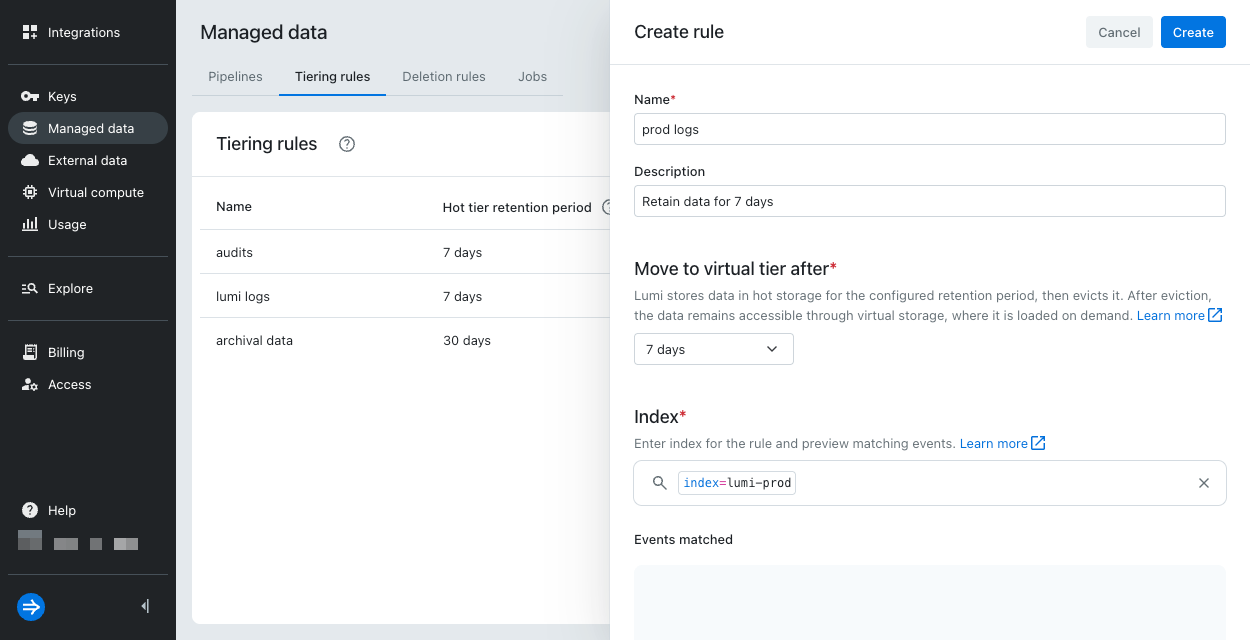 You can preview matching events in the Events matched section.
- Click Create.
Modify a tiering rule
To edit, duplicate, or delete a tiering rule:
- From the Lumi navigation menu, click Managed data > Tiering rules.
- Click the ellipsis next to the rule name.
- Select Edit, Duplicate, or Delete.
- If editing or duplicating, make the necessary changes, then click Save.
- If deleting, confirm your selection, then click Delete.
How Lumi applies tiering rules
When more than one rule targets the same index, Lumi uses the following logic to determine which rule applies.
Conflicting tiering rules
If two tiering rules target the same index, Lumi applies the rule with the longest retention period.
The following diagram shows tiering rules A and B that target the same index. Lumi applies rule B because it has a longer retention period.
Rule precedence
Deletion rules take precedence over tiering rules.
The following diagram shows a tiering rule and a deletion rule that target the same index. Lumi applies the deletion rule.
Learn more
For more information, see the following topics:
- Virtual tier overview to learn how the hot and virtual tiers work.
- Manage virtual compute pools to create and manage virtual compute pools.
- Manage deletion rules to set up automatic data deletion.