Lumi Enterprise storage metrics
AI summary
About AI summaries.
This is an early access feature. Recommendations in this topic are subject to change.
Imply Lumi Enterprise provides storage metrics to help you understand how your data is distributed across tiers. Monitoring storage metrics is especially useful for managing costs, planning capacity, and verifying that your tiering rules work as expected. For help adjusting your Lumi configuration in response to these metrics, contact your Imply support representative.
This topic describes storage metrics for Lumi Enterprise.
Prerequisites
To view storage metrics, you need the Admin role. For information on roles and permissions, see Manage roles.
View storage metrics
To view storage metrics:
- Open the Lumi Management Console.
- Click Usage in the left sidebar.
- Go to the Storage tab.
Compressed data
The compressed data metrics show the average size of compressed data distributed across the hot and virtual tiers over the selected time period. Use these metrics to determine whether your current tier capacity is appropriate for your workload. For example, if you have a large amount of data in hot storage and your churn ratio is low, consider adding:
- A tiering rule to evict data from hot storage
- A deletion rule to remove unnecessary data
You can also use these metrics to plan local storage capacity on your nodes.
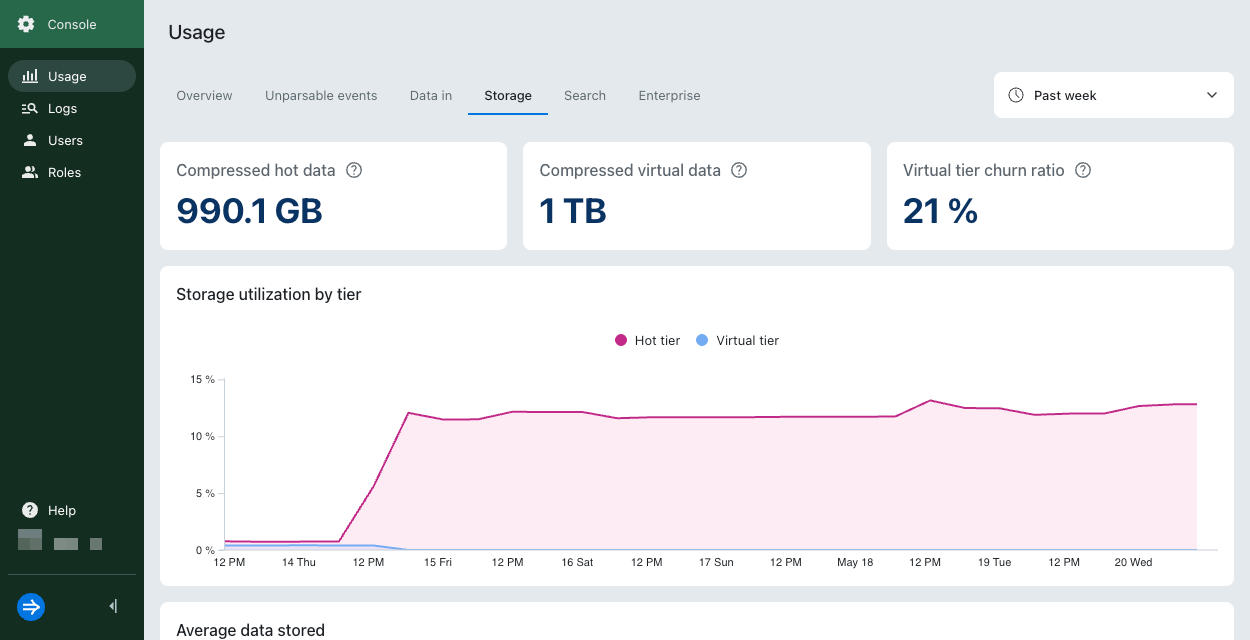
Storage utilization by tier
Shows the percentage of allocated storage currently in use by each tier. Use this metric to monitor how effectively each tier is utilizing its allocated storage resources:
- Below 50%: Your tier may be underutilized.
- Above 80%: Your tier is near capacity. Consider adjusting the data retention period or increasing the size of your virtual compute pool.
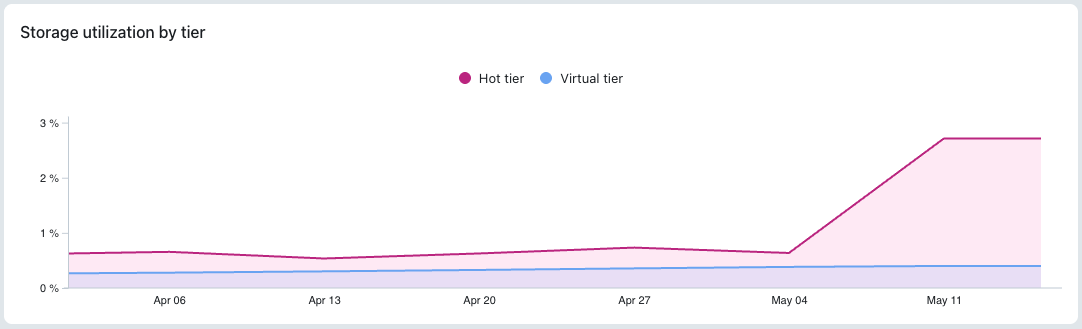
If the hot tier reaches capacity, it can't accept any new data. The impact depends on whether you have a virtual tier configured:
- Without a virtual tier: Some hot storage data becomes unavailable for querying. Lumi continues to ingest new data, but it remains unavailable until you either add more hot tier capacity or configure a virtual tier.
- With a virtual tier: You can still query excess data through the virtual tier.
If your virtual tier reaches capacity, Lumi evicts less recently accessed data from the caching layer to make room for newly requested data. The evicted data gets reloaded into virtual storage as needed.
Average data stored
Shows the average amount of compressed data stored per tier over the selected time period. Use this metric to track your typical storage footprint and compare how much data is stored in each tier over time.
Virtual tier churn ratio
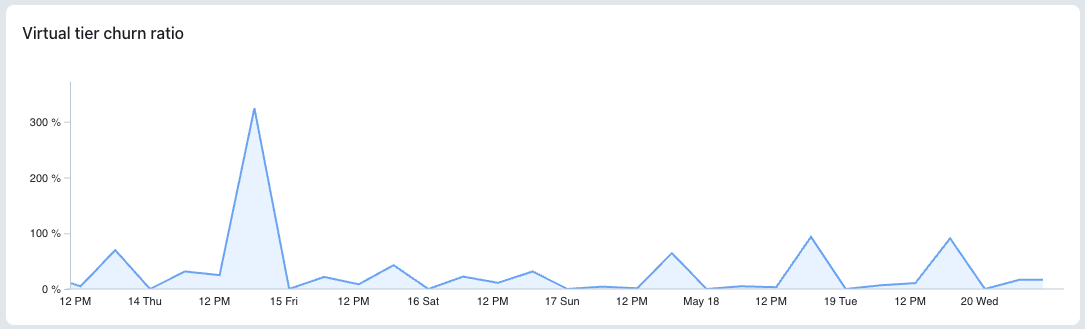
Shows the percentage of data evicted from virtual storage relative to the data scanned by queries. The evicted data remains accessible and gets reloaded into virtual storage as needed.
- Below 50%: Your virtual tier is properly sized. Consider gradually reducing your virtual tier infrastructure to find the right balance between cost and performance. Note that 0% churn doesn't signify that there is an issue. It could mean that virtual storage already contains the data that satisfies the query.
- Above 50%: Your virtual tier may be undersized. Consider increasing virtual tier infrastructure or expanding the hot data retention period.
Learn more
For more information, see the following topics:
- Configure tiering rules to use a virtual tier.
- Configure deletion rules to set up automatic data deletion.
- Send events to Lumi for different ways you can send events to Lumi.