Custom time patterns
AI summary
About AI summaries.
The timestamp on an event in Imply Lumi describes when the event occurred. Lumi can parse common timestamp formats, such as ISO 8601. If Lumi doesn't recognize the format of your timestamp, you can define its format and assign the event timestamp using a pipeline. Follow the process in Assign event timestamps using a pipeline, and for Time format, select Custom to provide your own pattern.
The custom time format uses DateTimeFormatter syntax.
For example, the pattern yyyy represents a four-digit year like 2026.
If processing fails, such as from an invalid pattern, Lumi assigns the current timestamp.
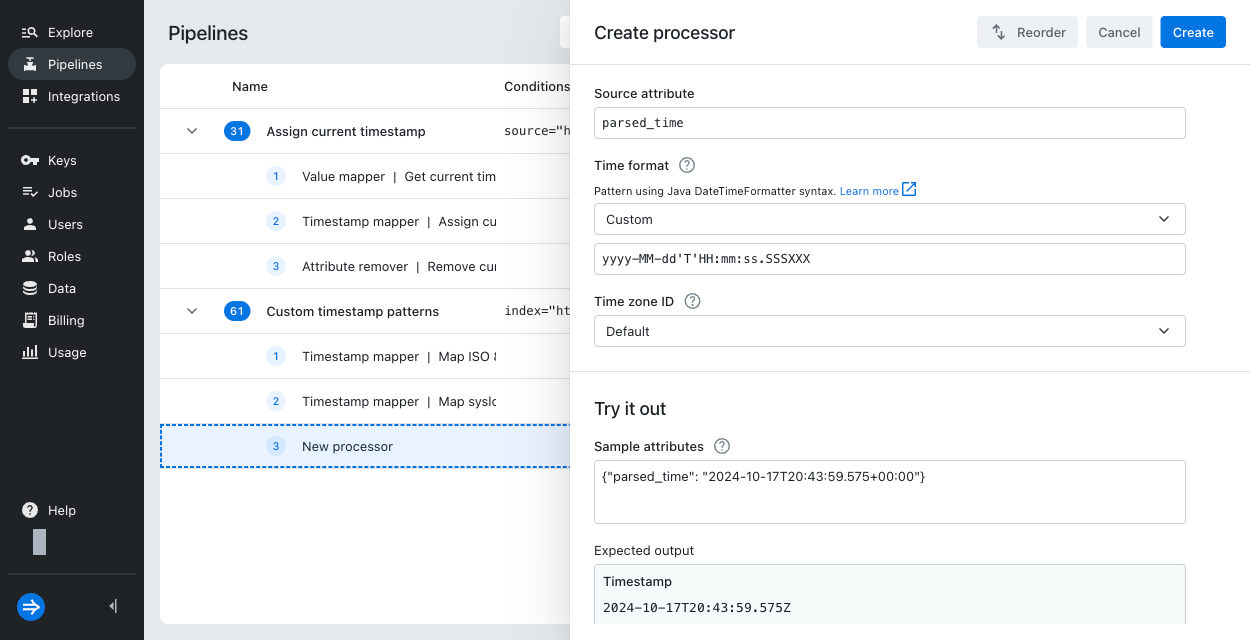
This topic provides more information about the custom time format and gives examples for common log types.
Common patterns
This section provides a subset of DateTimeFormatter syntax for common timestamp patterns.
Note that all patterns are case-sensitive. For example, a lowercase m represents minutes, but an uppercase M represents month.
Don't confuse the custom time format with the POSIX standard strptime format.
strptime format always uses two-character codes starting with % and doesn't use pattern repetition such as yyyy.
The table includes strptime directives you can use for comparison and translation to use in Lumi.
| Category | Lumi pattern | Example | Description | strptime |
|---|---|---|---|---|
| Year | yy | 26 | 2-digit year; Java uses 2000 as the base year | %y |
yyyy | 2026 | 4-digit year | %Y | |
| Month | MM | 01 | Month number | %m |
MMM | Jan | Abbreviated month name | %b | |
MMMM | January | Full month name | %B | |
| Day | dd | 16 | 2-digit day | %d |
| Hour | HH | 23 | Hour based on 24-hour clock | %H |
| Minute | mm | 59 | 2-digit minute | %M |
| Second | ss | 31 | 2-digit second | %S |
| Fraction of second | SSS | 123 | Partial seconds; specify up to 9 instances of S based on the time granularity | %f (exactly six digits) |
| Time zone | z | UTC | Name of the time zone | %Z |
Z | +0100 | Offset from UTC, where a zero offset is denoted by +0000 | %z | |
X | +01:00 or Z | Offset from UTC, where a zero offset is denoted by the value Z | %z |
Examples by log type
The following table shows the custom time patterns for some common log types:
| Log type | Example timestamp | Pattern |
|---|---|---|
| Windows event log (XML) | 2026-03-24T14:32:07.483000000Z | yyyy-MM-dd'T'HH:mm:ss.SSSSSSSSSX |
| Palo Alto Networks firewall | 2026/01/22 02:20:18 | yyyy/MM/dd HH:mm:ss |
| syslog (RFC 3164) | Oct 18 02:31:00 | MMM dd HH:mm:ss |
| Java application | 2026-03-05 21:30:58.000 CET | yyyy-MM-dd HH:mm:ss.SSS z |
| Cisco ASA | Apr 01 2026 09:36:50 | MMM dd yyyy HH:mm:ss |
For timestamps that don't contain the year component, see how Lumi assigns the missing year.
Time zone patterns
Timestamps can store the time zone in various formats, such as its name or UTC offset. The following table lists the time zone patterns you can use in the custom time format specification.
Use square brackets [] to denote optionality. For example, yyyy-MM-dd'T'HH:mm:ss[XX], if some timestamps don't have a time zone.
| Symbol | Time zone representation | Example timestamp | Example pattern |
|---|---|---|---|
z | Time zone name | Wed, 01 Oct 2025 13:55:36 GMT | EEE, dd MMM yyyy HH:mm:ss z |
Z | Offset from UTC,+HHMM or -HHMM | 01/Oct/2025:22:55:36 +0900 | dd/MMM/yyyy:HH:mm:ss Z |
X | Offset from UTC, +HH | 2025-10-01T14:55:36+01 | yyyy-MM-dd'T'HH:mm:ssX |
XX | Offset from UTC, +HHMM | 2025-10-01T14:55:36+0100 | yyyy-MM-dd'T'HH:mm:ssXX |
XXX | Offset from UTC, +HH:MM | 2025-10-01T14:55:36+01:00 | yyyy-MM-dd'T'HH:mm:ssXXX |
O | Localized offset from UTC, short form | 2025-10-01T14:55:36 GMT+1 | yyyy-MM-dd'T'HH:mm:ss O |
OOOO | Localized offset from UTC, long form | 2025-10-01T14:55:36 GMT+01:00 | yyyy-MM-dd'T'HH:mm:ss OOOO |
VV | Time zone ID | 2025-10-01T09:55:36 America/New_York | yyyy-MM-dd'T'HH:mm:ss VV |
Learn more
For more information, see the following topics:
- Assign event timestamps using a pipeline for a step-by-step guide on assigning the event timestamp.
- Timestamp detection for details on how Lumi assigns event timestamps.