IAM key attribute reference
AI summary
About AI summaries.
An IAM key authorizes your requests to send or search events in Imply Lumi from a third-party application. When you create a key, you add and configure an integration for the application. These configuration settings are called IAM key attributes. IAM key attributes include default values for event metadata and configuration parameters to parse events. To learn how Lumi prioritizes assignment for attributes that store default values, see User attribute defaults.
This topic provides reference information on IAM key attributes. Before continuing, ensure that you have a basic understanding of the event model and IAM keys.
Global attributes
The global attributes Environment and Team apply to all ingestion integrations.
Lumi assigns these values to the env and team system attributes, respectively.
If you don't set the global attributes, Lumi doesn't create the system attributes.
You can only search system attributes within Lumi.
HEC attributes
HEC attributes configure default fields and indexing settings for the Splunk® HEC integration.
For the list of HEC attributes, see Send events with Splunk HEC.
S2S attributes
S2S attributes configure event parsing for incoming events from universal forwarders. Lumi doesn't store S2S attributes with the events.
You can define multiple sets of S2S attributes on the same key. See Conditional attributes.
For the full list of S2S attributes and configuration details, see Event parsing for S2S.
Note that these settings don't apply to incoming events from heavy forwarders.
S3 pull attributes
S3 pull attributes configure access management and user attribute defaults for the S3 pull integration Use this integration to ingest objects in an S3 bucket with a recurring or one-time backfill job. For a list of attributes, see S3 pull.
Federated search attributes
Federated search attributes on a Lumi IAM key control how Splunk accesses and queries Lumi data.
The following table describes the federated search attributes:
| Attribute | Description | Default |
|---|---|---|
| Allowed indexes | Controls which Lumi indexes can be queried through the federated search integration. See Configure allowed indexes for details on the available options. | None |
| Virtual compute pool | Assigns a virtual compute pool to the key to enable virtual tier access. Applies to Lumi deployments that have the virtual tier enabled. | No virtual tier access |
| Query timeout | Controls how long a query can run before it is automatically canceled. The timeout value must be between 5 and 60 minutes. | 5 |
| Data model | Contains field mappings to translate between Lumi event fields and data model fields defined in Splunk. Applies to transparent mode federated search only. See Query Lumi events with data models for details on how to configure the JSON object for this attribute. | False |
Virtual tier access
To enable virtual tier access for an IAM key with the federated search integration, select a virtual compute pool from the Virtual compute pool drop-down.
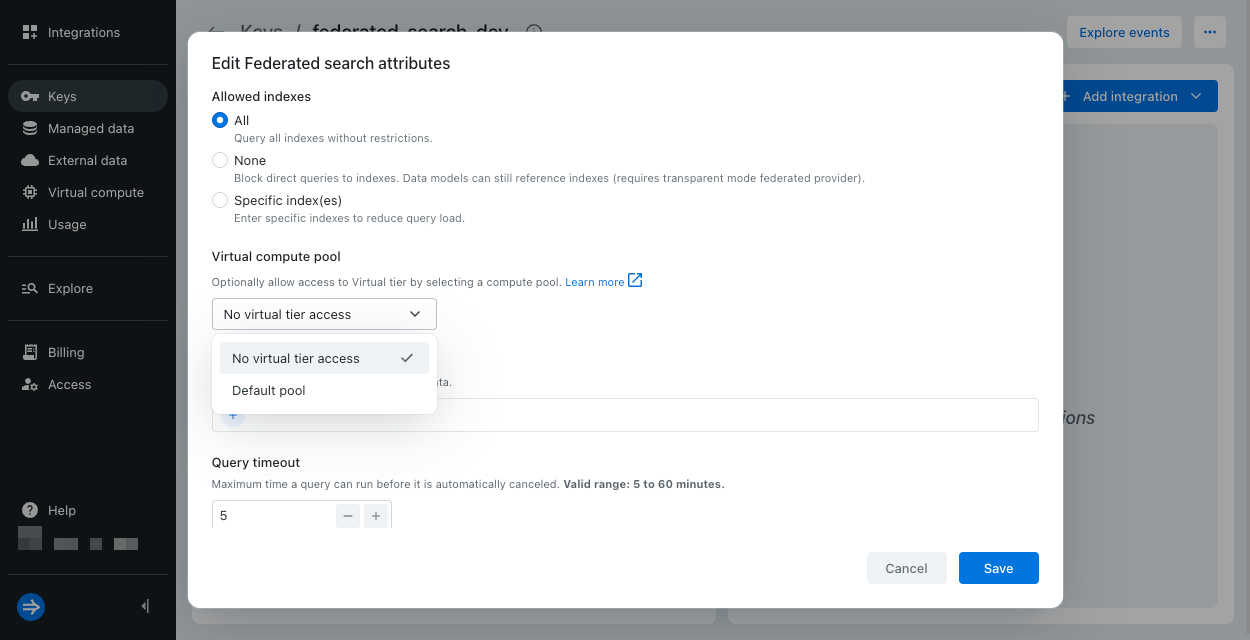
When creating an IAM key from the Integrations page, the drop-down defaults to the default pool if one exists.
If No virtual tier access is the only option available, you don't have any virtual pools configured. To create a virtual compute pool, see Create a virtual compute pool.
An IAM key can only be assigned to one pool, but a pool can have multiple IAM keys.
Grafana attributes
Grafana attributes apply to the Grafana integration for searching Lumi events using Grafana Loki.
Use Labels on an IAM key to configure Lumi user attributes as Grafana Loki labels, making them available for filtering and querying in LogQL.
The Lumi index attribute automatically maps to service_name in Grafana.
See Configure user attributes as labels for details.
Learn more
For more information, see the following topics:
- IAM keys to learn about how IAM keys work in Lumi.
- Manage IAM keys to learn how to create and manage an IAM key.
- Lumi concepts for Splunk users to learn how default fields and event parsing relate between Lumi and Splunk.
- Assign Splunk default fields for assigning index, source, or source type attributes.