Recurring ingestion from S3 using object notifications
AI summary
About AI summaries.
You can use the S3 pull integration to configure recurring ingestion from Amazon S3 to Imply Lumi. When you configure event notifications from an S3 bucket, Lumi automatically retrieves and ingests events from new objects as they are created. Lumi only detects new objects, not changed ones.
This topic provides details on configuring SNS-based recurring ingestion with S3 pull.
For a tutorial on configuring recurring jobs with S3 pull, see How to ingest events from S3 event notifications.
The instructions in this topic reflect AWS configurations as of October 2025.
Prerequisites
Before you continue, review Send events with S3 pull and ensure that you:
- Meet the prerequisites
- Configured AWS access
- Created a Lumi IAM key
How recurring SNS works
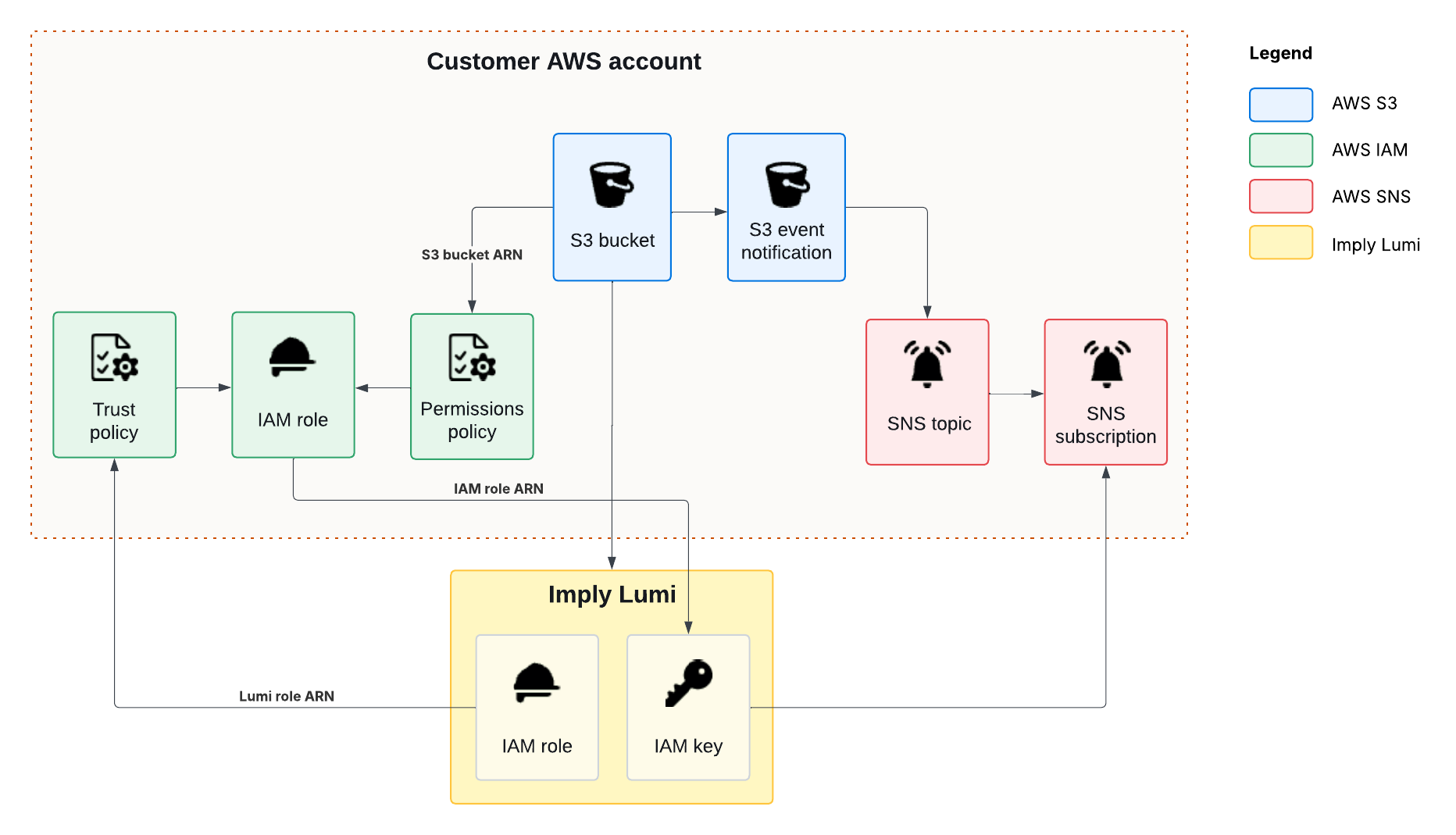
The following workflow describes how recurring ingestion works between Amazon S3 and Lumi:
- Complete the steps in Send events with S3 pull to set up AWS access.
- Create an Amazon Simple Notification Service (Amazon SNS) topic and subscribe the Lumi endpoint to it.
- Configure an S3 event notification to publish messages about new objects to the SNS topic.
- When a new object is added to the S3 bucket, Amazon S3 generates an event notification and publishes it to the SNS topic.
- Amazon SNS delivers the notification to the Lumi endpoint.
- Lumi processes the notification and retrieves the event data from Amazon S3 for ingestion.
The following diagram shows how AWS services and Lumi interact to send events through recurring ingestion:
Create an SNS topic and subscription
An SNS topic acts as a communication channel for publishing messages that you can then broadcast to different subscribers.
Obtain the Lumi endpoint URL:
- From the Lumi navigation menu, click Integrations > S3 pull.
- In Select the job type, select Recurring.
- Select your AWS access method and your Lumi IAM key.
- For the discovery method, select SNS subscription.
- The page populates with the information required to create an SNS subscription. Save the endpoint URL.
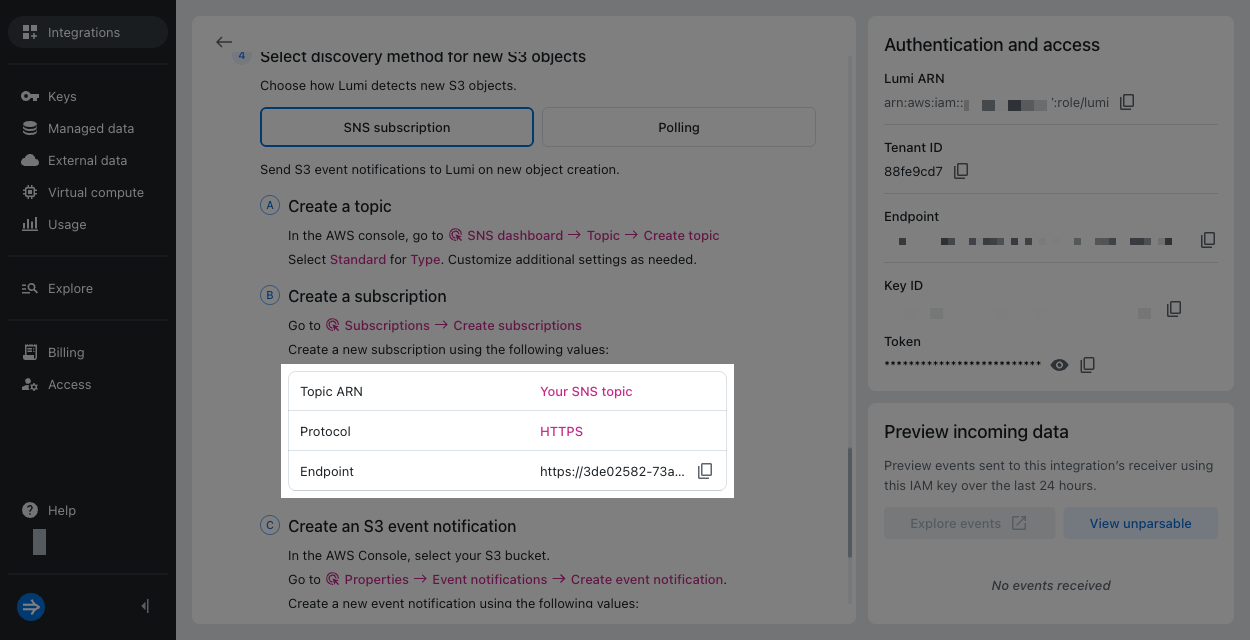
Create an SNS topic in AWS and subscribe the Lumi endpoint to it:
- In the AWS console, go to the SNS dashboard.
- Click Topics in the left sidebar, then click Create topic.
- Select
Standardfor Type. - Enter a name for the topic.
- Click Create topic. Save the ARN of the topic. You'll need it in a later step.
- Click Subscriptions in the left sidebar, then click Create subscription.
- Enter the following details:
- Topic ARN: Select the SNS topic you created.
- Protocol:
HTTPS - Endpoint: Lumi endpoint URL resembling
https://IAM_KEY_TOKEN@s3-pull.us1.api.lumi.imply.io/notifications.
- Click Create subscription.
Create an event notification
Create an event notification for your S3 bucket to trigger a notification when a new object is created:
- In the AWS console, go to Amazon S3.
- Select your S3 bucket.
- Go to the Properties tab.
- In Event notifications, click Create event notification.
- In General configuration, enter a name for the event.
- Optionally, specify a prefix and a suffix to only send notifications for desired objects:
- Prefix (optional): Filter notifications by prefix.
- Suffix (optional): Filter notifications by suffix.
For more information, see the AWS documentation for configuring event notifications using object key name filtering.
- In Event types, select
All object create events (s3:ObjectCreated:*). - In Destination, select SNS topic.
- Select the SNS topic you created previously.
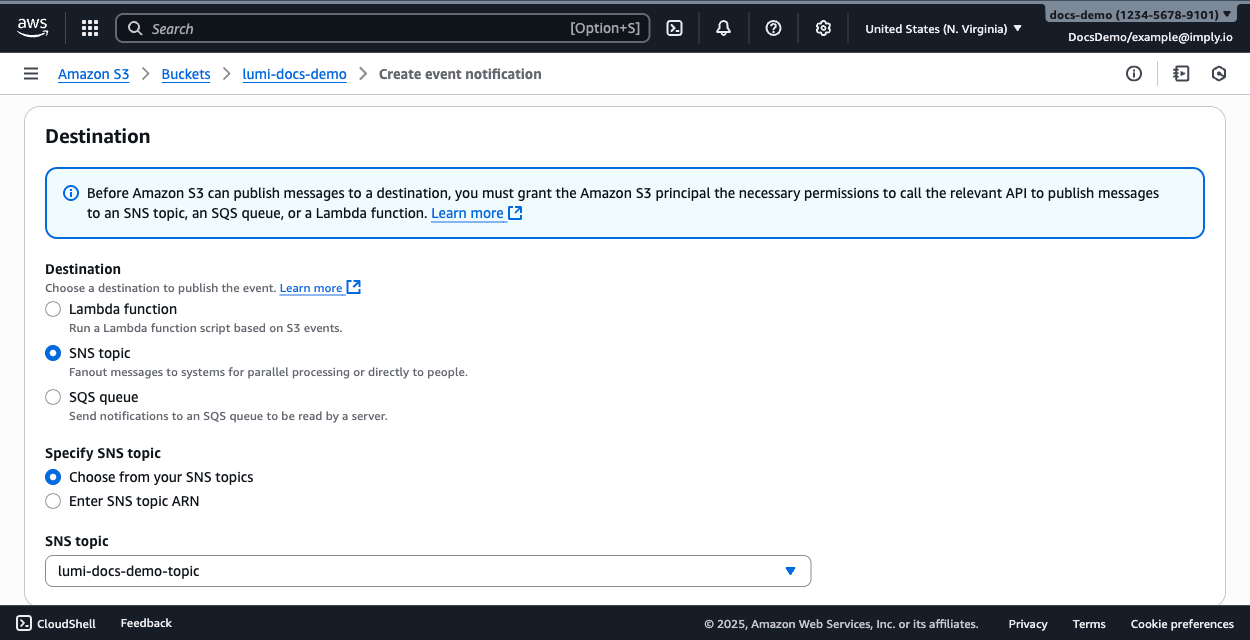
- Click Save changes.
Events start flowing in once new objects enter the bucket. Unlike backfill or polling, SNS-based ingestion isn't a job, so there's nothing to monitor or manage in Lumi.
To view and query the events, follow the steps to access the explore view for your IAM key and integration.
Learn more
See the following topics for more information:
- Send events with S3 pull for how to configure permissions between Lumi and AWS.
- Recurring ingestion from S3 at fixed intervals to configure recurring ingestion at fixed time intervals.