Troubleshoot access for S3 pull
AI summary
About AI summaries.
AWS Identity and Access Management (IAM) configuration mistakes for a backfill or poll-based recurring S3 ingestion job can prevent the job from starting. An access misconfiguration like invalid bucket permissions or an improperly configured IAM role will cause Imply Lumi to surface errors originating from AWS.
For example, the following 403 error that results if you enter an incorrect ARN for your AWS IAM role:
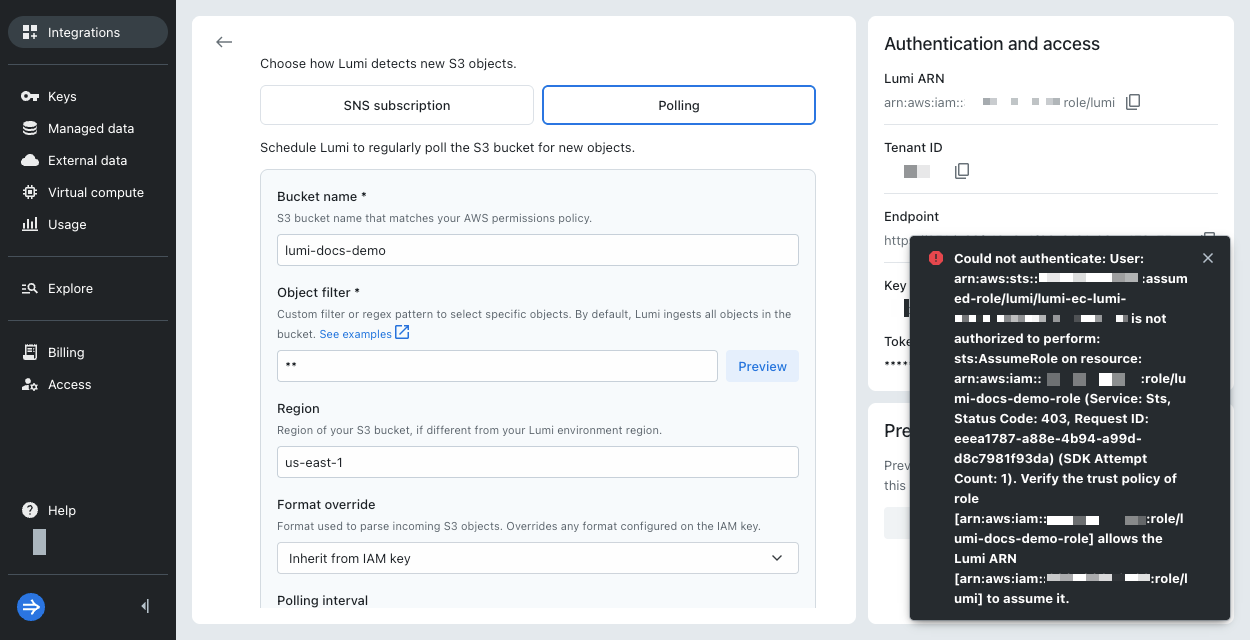
This reference describes potential AWS errors you might see in Lumi and how to resolve those errors.
For details on the S3 pull integration, see Send events with S3 pull.
Invalid AWS IAM role
Error message:
Invalid credentials
Remediation: Confirm that you have the correct AWS IAM role ARN on your Lumi IAM key. This error arises when the ARN doesn't have the correct syntax, such as missing the arn:aws:iam::<account>:role/<name> structure.
Unable to assume your AWS IAM role
Error message:
Unexpected STS response [403]: User: LUMI_AWS_ROLE_ARN is not authorized to perform: sts:AssumeRole on resource: CUSTOMER_AWS_ROLE_ARN (Service: Sts, Status Code: 403, Request ID: ...)
Remediation: Revisit the trust policy on your AWS IAM role.
- Check that the trust policy on your AWS IAM role matches the one in the S3 pull integration. It includes the ARN of the Lumi AWS IAM role similar to
arn:aws:iam::987654321000:role/lumi. - Go to your Lumi IAM key and confirm that you provided the correct AWS IAM role ARN. For example,
arn:aws:iam::123456789012:role/my-example-role.
S3 bucket is inaccessible due to incorrect ARN or permissions policy
Error message:
Bucket [BUCKET_NAME] does not exist or is not accessible in region [REGION]. Verify the bucket policy grants the required permissions to the Lumi ARN [LUMI_AWS_ROLE_ARN].
Remediation: Revisit the permissions policy on your AWS IAM role.
- Confirm that you supplied the correct S3 ARN for your bucket. For example,
arn:aws:s3:::lumi-docs-demo. - Check that the ARN matches the permissions policy provided in the S3 pull integration.
S3 bucket is inaccessible with an AWS access key
Error message:
Bucket [BUCKET_NAME] does not exist or is not accessible in region [REGION]. Verify the IAM user backing the access key has s3:ListBucket and s3:GetObject on this bucket.
Remediation: Revisit the permissions policy on your AWS IAM user.
- Confirm that you supplied the correct S3 ARN for your bucket. For example,
arn:aws:s3:::lumi-docs-demo. - Check that the ARN matches the permissions policy provided in the S3 pull integration.
S3 bucket is in a different region
Error message:
Failed to access bucket [BUCKET_NAME]: Moved Permanently (Service: S3, Status Code: 301, Request ID: ...)
Remediation: Determine the region where your S3 bucket is hosted, for example, us-east-1. Verify that your backfill or poll-based recurring job uses the same region as your bucket.