Transform events using pipelines
AI summary
About AI summaries.
Event transformation is essential for observability applications to ensure proper timestamp handling, improve searchability, and optimize storage costs and query performance. Through parsing, enrichment, and other metadata management, you can extract critical information from raw logs, add contextual data, and maintain data quality and consistency throughout your observability pipeline. For example, you might carry out the following transformations:
- Add metadata to describe the source of an event
- Remove metadata to avoid storing personally identifiable information
- Parse the event message to extract IP traffic details for easier troubleshooting
In Imply Lumi, you transform events using pipelines. Pipelines are channels that process events before Lumi writes them to storage. For every event that enters, exactly one processed event comes out. Pipelines don't create or delete events.
In this topic, you'll learn about the components of a pipeline and how to create and manage pipelines.
To learn how to work with pipelines and processors, see Manage pipelines and processors. For a tutorial on how to create a pipeline, see How to build pipelines.
Pipeline conditions
You define the conditions to filter events that enter the pipeline. If an event doesn't satisfy the conditions for any pipeline, Lumi stores it without processing. Use Lumi query syntax to define filters on incoming event metadata or system attributes.
The following syntax behavior applies to pipeline conditions:
- Use
ANDorORto join multiple search criteria. - A standalone string matches an event when the event message contains the string.
- For system attributes such as
env, preface the name with#. - You can't use the equality operator
=with the event message or timestamp. - You can't use the wildcard operator
*to match all events for a pipeline.
The following examples are valid event conditions:
# filter events labeled with the main index
index=main

# filter events from the otel source and access_combined source type
source=otel AND sourcetype=access_combined

# filter events that contain the text "hello world" and labeled with the prod environment
"hello world" AND #env=prod

# filter events sent with a specific integration and IAM key
#iamKeyId=3e99daf3-xxxx-xxxx-xxxx-1aa2b41d62ba #receiver=splunk.hec
To designate a pipeline for a particular IAM key and integration, go to the integration page, select the key, and click Explore events. For an example of how to find the query for a given integration and key, see Check Imply Lumi for events.
Processors
Pipelines contain processors, which perform the event transformation tasks. Processors can perform field extractions using regular expressions as well as add or remove attributes. Each processor is unique to a pipeline. That is, you can't reuse a processor in multiple pipelines.
The following diagram shows an example pipeline that does the following:
- Extracts text from the event message using a regular expression and assigns it to a user attribute named
realm. - Renames the incoming metadata field named
statustohttp_status. - Deletes the
useridandstatusevent metadata.
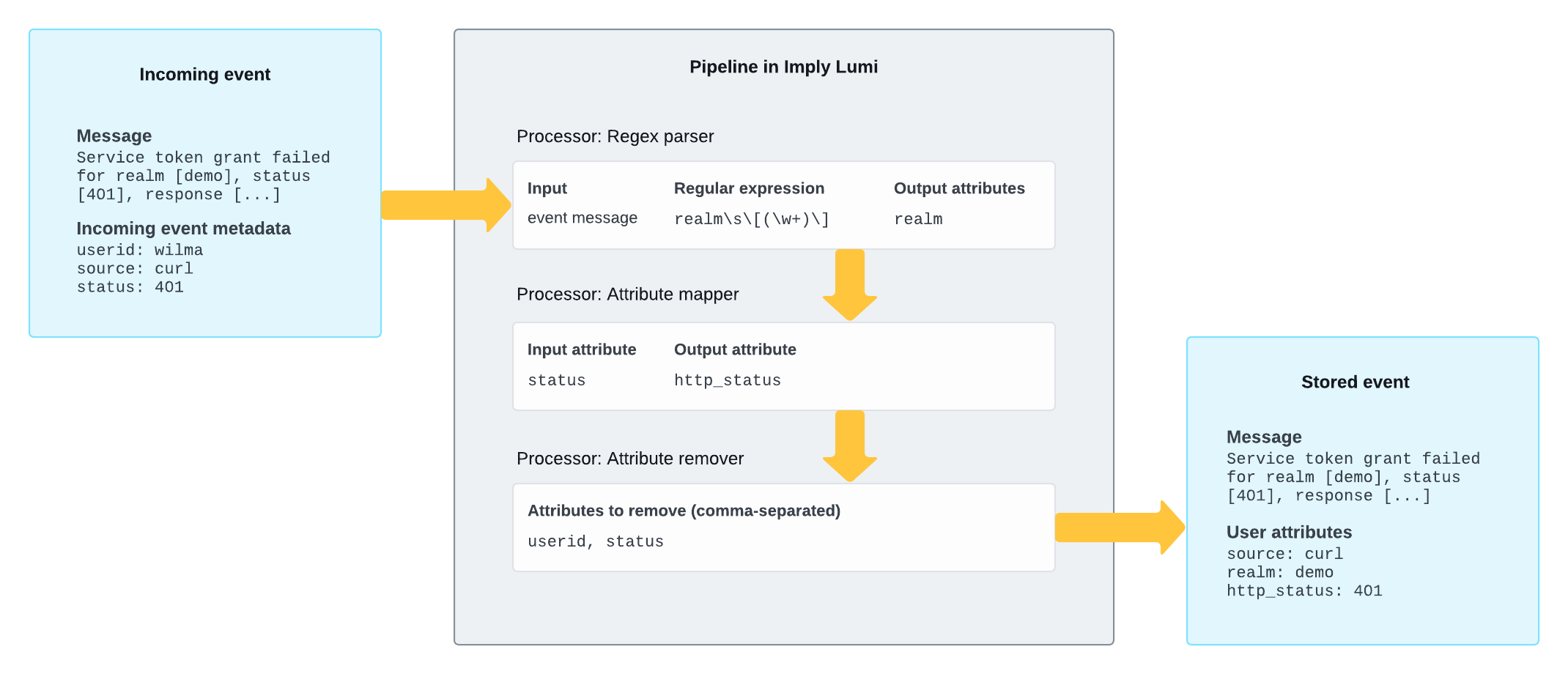
For reference and examples of all processor types, see Processors.
Order of operations
Processors within a pipeline operate on an event in numerical order. When one processor adds an attribute to an event, a subsequent processor can refer to the attribute.
For an event that satisfies multiple pipelines, Lumi processes the event through each of those pipelines in numerical order. If you add an attribute in one pipeline, a subsequent pipeline can use that attribute.
If processing fails for any reason, the event continues without changes to any subsequent processor or pipeline. Otherwise Lumi stores the event as is.
Compare to Splunk configuration
Think of a pipeline in Lumi as conceptually similar to a combination of props.conf and transforms.conf in Splunk®.
Here’s an example Splunk configuration that extracts text inside realm [ ... ] as the realm field, which for the example message in the above diagram results in realm=demo:
transforms.conf
[extract_realm]
REGEX = realm\s\[([^\]]+)\]
FORMAT = realm::$1
props.conf
[source::...]
TRANSFORMS-extract_realm = extract_realm
In Lumi, this logic is handled in a pipeline using a regex processor that extracts realm from the message.
For more information, see Lumi concepts for Splunk users.
Process events before Splunk® federated search
You can't apply search-time field evaluations on Lumi events through Splunk federated search. Be sure that you transform events at ingestion using a pipeline to support your queries.
If you want to query Lumi events using a data model, you don't need to rename Lumi attributes to match Splunk field names. You can assign the mapping directly in the data model attribute on your IAM key for federated search.
Learn more
See the following topics for more information:
- How to build pipelines for a tutorial on creating pipelines.
- Manage pipelines and processors for how to create and manage pipelines and processors.
- Processors reference for the types of processors available in Lumi.
- Predefined pipelines for curated pipelines for specific data sources.
- Nested pipelines for organizing pipelines using nesting.