Assign event timestamps using a pipeline
AI summary
About AI summaries.
Imply Lumi automatically detects and assigns timestamps on incoming events. If Lumi doesn't identify or can't parse a timestamp in the raw event message, the event timestamp becomes the time Lumi received it. You can parse and overwrite the event timestamp using a timestamp mapper in a pipeline.
You can also capture the event indexing time using a pipeline with a value mapper. This stores the timestamp Lumi received the event, which can help you troubleshoot any issues with forwarding agents and sending events.
This topic shows how to parse timestamps from the event message and how to obtain the event indexing time.
For incoming events that use the S2S integrations or Splunk HEC with raw text, you can configure timestamp detection using Splunk event parsing settings.
Set event timestamp
A timestamp mapper is a pipeline processor that assigns the timestamp from your chosen user attribute. If Lumi can't parse the timestamp from the source attribute, the event timestamp is unchanged.
Use the following process to set the timestamp in a pipeline:
-
Create a pipeline, and set its conditions to match the incoming events.
-
Define the attribute that contains the source timestamp value. If the event already contains this attribute, such as
time, you can skip this step.-
To define the attribute from part of the event message, extract it with a regex parser or grok parser. For example, configure a regex parser with the following:
- Source attribute: Log body
- Regular expression: Regex pattern that matches on the timestamp
- Output attribute: Name for a temporary attribute, such as
parsed_time
-
To define the attribute from the ingestion time, use a value mapper.
-
-
Add a timestamp mapper with the following configuration:
- Source attribute: Name of the user attribute from the previous step.
- Time format: Format of the timestamp. See supported time formats.
- Time zone ID: Time zone such as
America/Los_Angeles. Only applies when the timestamp doesn't already contain the time zone, and defaults to UTC if unspecified.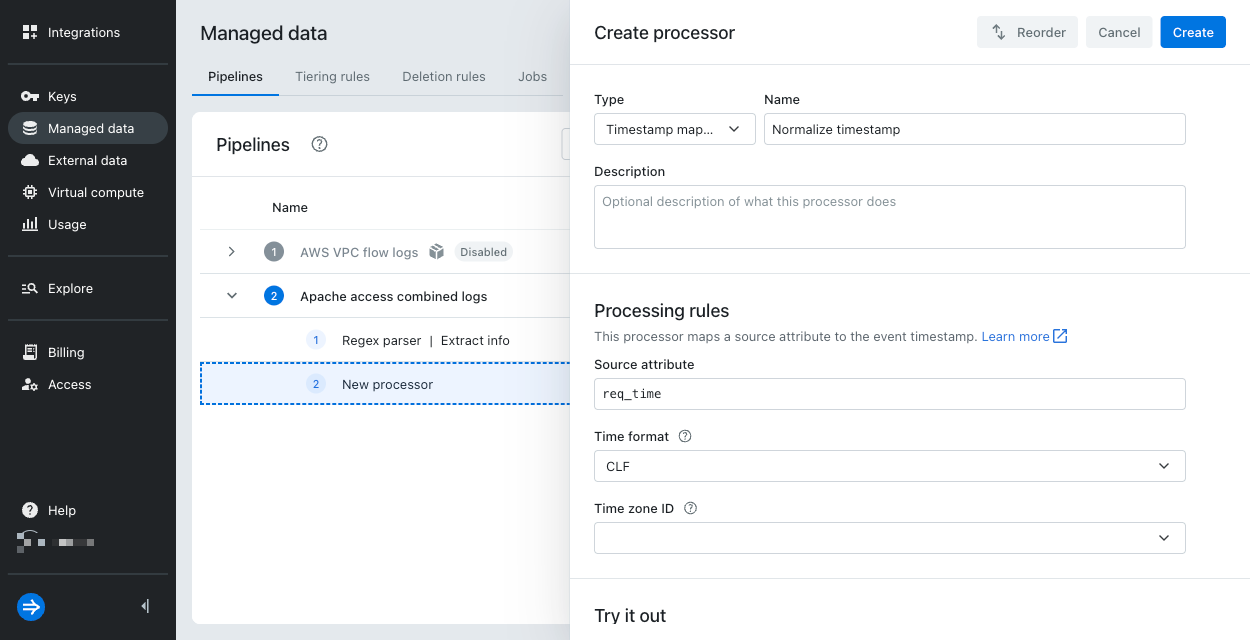
-
Click Create.
-
Optionally, create an attribute remover to remove the user attribute.
-
Save the pipeline, and optionally simulate it on a test set of events.
To follow along with this process in a tutorial, see How to build pipelines.
Store event indexing time
By default, Lumi doesn't store the event indexing timestamp, the time Lumi ingested your event. You can configure a pipeline to store it as a user attribute.
This timestamp corresponds to the Splunk® default field _indextime.
You can use it to filter searches by the ingestion time range, such as to troubleshoot forwarding issues like network latency.
This timestamp also supports search modifiers _index_earliest and _index_latest in federated search.
To obtain the event indexing time:
- Create a pipeline if you don't already have one. Ensure the pipeline conditions match the events you want to process.
- In the pipeline, add a value mapper.
- Select the option Set to Unix time of event indexing.
- Provide a value for the output attribute name. The default name is
_indextime.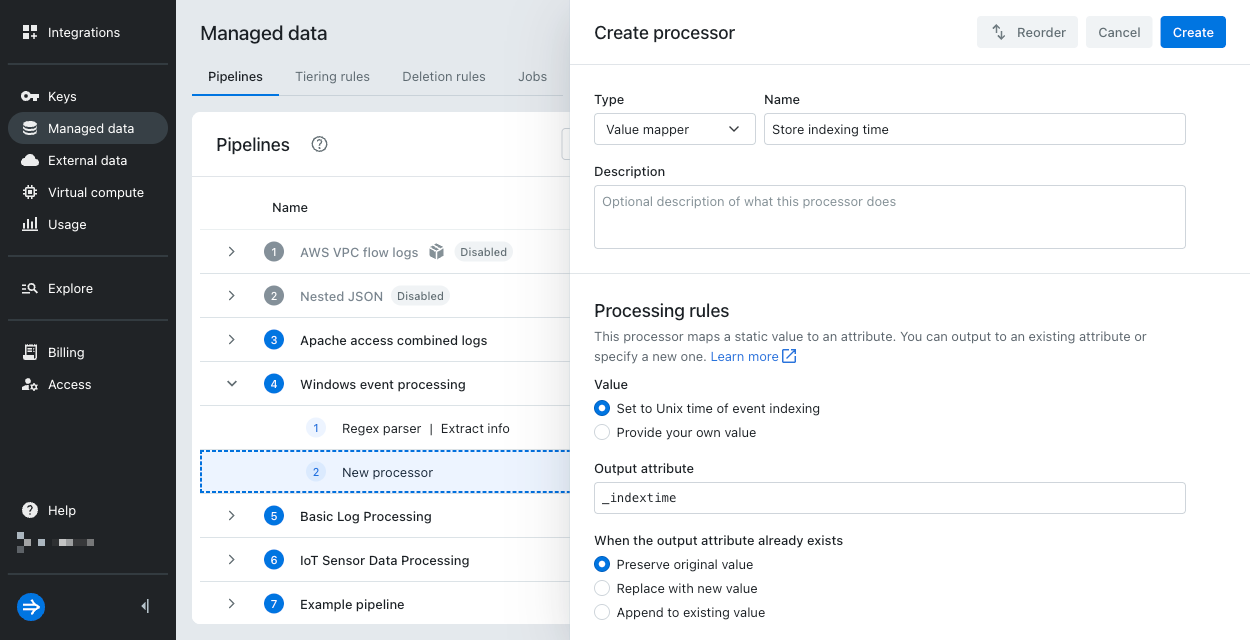
- Click Create.
- Save the pipeline, and optionally simulate it on a test set of events.
You can use the attribute in a subsequent processor or when searching events.
Time formats
In a timestamp mapper, you can select from one of the following formats:
| Time format | Description | Example |
|---|---|---|
ISO_8601 | ISO 8601 standard | 2025-07-01T02:47:05.000Z |
EPOCH_SECONDS | Number of seconds since epoch time | 1749599182 |
EPOCH_MILLISECONDS | Number of milliseconds since epoch time* | 1749599182000 |
EPOCH_MICROSECONDS | Number of microseconds since epoch time | 1749599182000000 |
EPOCH_NANOSECONDS | Number of nanoseconds since epoch time | 1749599182000000000 |
DATE | HTTP date format | Tue, 15 Nov 1994 08:12:31 GMT |
CLF | Common log format | 10/Oct/2011:13:55:36 -0700 |
AUTO | Automatically detect one of the preceding formats | N/A |
CUSTOM | Custom time pattern using DateTimeFormatter syntax. For details and examples, see Custom time patterns.Note that this syntax differs from strptime format you can use for parsing S2S timestamps. | yyyy-MM-dd HH:mm:ss to represent 2025-08-05 15:45:00 |
*The epoch time represents the Unix epoch: January 1, 1970, at 00:00:00 UTC.
Learn more
For more information, see the following topics:
- Processors for details on the timestamp and value mappers.
- Custom time patterns to define custom patterns that match your timestamps.
- Manage pipelines and processors for details on creating and managing pipelines.